 56a6e2da93
- src/dist 산출물 분리 원칙 정리(.gitignore, .gitattributes)
- 루트 및 주요 폴더(config/scripts/prompts/tests/src, 런타임 폴더 5종)에
  안내용 README.md 추가
- CHANGELOG.md, LICENSE, docs/ops/05-release-and-versioning.md 추가
- docs/README.md 문서 지도 갱신
198 KiB
AI 에이전트 CLI headless 실행 비교 (참고용)
이 문서의 지위: 대안 비교와 설계 원칙 (참고)
이 프로젝트가 채택한 AI CLI 는 Google Antigravity CLI (
agy) 다. agy 자체의 정본 명세는05a-agy-cli-ssot.md에 있으니 구현할 때는 그 문서를 보라.이 문서의 역할은 두 가지다.
- 다른 CLI(Claude Code, Gemini CLI, Codex CLI 등)의 headless 방식을 비교해, agy 선택의 상대적 위치를 남긴다.
- CLI 종류와 무관하게 유효한 headless 파이프라인 설계 원칙을 정리한다. 이 부분은 구현에 직접 적용된다.
이 문서의 역할(상세): DMF_Crawler 가 채택한 Google Antigravity CLI (
agy) 이외의 대안 AI CLI(claude / gemini / codex / opencode)를 headless(비대화형)로 돌릴 때의 플래그·인증·권한·비용 모델을 한 표로 비교하고, "결정론적 코드 + LLM 보조" 형태의 headless 파이프라인 설계 원칙과 Windows 비대화형 실행의 공통 함정을 정본으로 남긴다.agy자체의 설치·플래그·부트스트랩 정본은docs/research/05a-agy-cli-ssot.md에 있으므로 이 문서에서는 중복 서술하지 않는다.
0. 한눈에 보기
이 문서에서 내린 결론:
- 채택 CLI 는
agy(Google Antigravity CLI) 로 확정되어 있고, 이 문서는 그 결정을 뒤집지 않는다. 다만agy가 설치 실패·인증 만료·쿼터 소진으로 못 돌 때를 대비해 claude / gemini / codex 를 "동일 인터페이스로 갈아끼울 수 있는 대체 백엔드" 로 설계한다. 그러려면 각 CLI 를 "프롬프트 파일 → stdin/인자 → JSON stdout" 이라는 하나의 계약으로 감싸야 한다. - 비대화형 실행 계약은 4개 CLI 가 거의 동형이다:
claude -p/gemini -p/codex exec/opencode run. 모두 (1) 프롬프트를 인자 또는 stdin 으로 받고, (2) 최종 결과를 stdout 으로 뱉고, (3) 종료 코드로 성패를 알리고, (4) JSON 출력 옵션을 갖는다. - 구조화 출력(스키마 강제)까지 지원하는 것은 claude(
--json-schema→structured_output필드)와 codex(--output-schema <path>) 뿐이다. gemini 는--output-format json으로{response, stats, error}봉투만 주고 내용 스키마는 강제하지 못한다. opencode 는--format json으로 raw 이벤트 스트림만 준다. → DMF 리포트의 "변경 요약" 같이 파싱해야 하는 산출물은 스키마 강제가 되는 백엔드를 1순위로 쓰고, 안 되는 백엔드에서는 우리 코드가 반드시 재검증(jsonschema)해야 한다. - 스케줄러 친화성의 핵심은 "TTY 없이 인증이 통과되는가" 하나다. claude 는
ANTHROPIC_API_KEY또는claude setup-token으로 만든CLAUDE_CODE_OAUTH_TOKEN(유효기간 1년), gemini 는GEMINI_API_KEY/GOOGLE_APPLICATION_CREDENTIALS, codex 는OPENAI_API_KEY/CODEX_API_KEY/CODEX_ACCESS_TOKEN또는~/.codex/auth.json, opencode 는~/.local/share/opencode/auth.json또는 provider 환경변수. 모두 "환경변수로 주입 가능" 하므로 Windows 작업 스케줄러에서 쓸 수 있다. - 구독(Pro/Max, ChatGPT Plus/Pro) 계정으로 headless 를 돌리는 것은 회색지대다. Claude 쪽은 2026-06-15 예정이던 "Agent SDK /
claude -p를 구독 한도에서 분리해 별도 크레딧으로" 변경이 시행 직전 보류(paused) 되어 현재는 여전히 구독 한도를 쓴다. Codex 는 공식 문서가 "비대화형 자동화는 API 키 또는 Codex access token 이 필요하고, 구독 시트만으로는 안 된다" 고 못박는다. → 운영 안정성을 원하면 API 키 과금이 정답이고, 구독 인증은 "되면 좋은 것" 으로만 취급한다. - AI 는 절대 크리티컬 패스에 두지 않는다. 크롤링·비교(diff)·xlsx 생성은 전부 결정론적 Python 이 하고, AI CLI 는 (a) 변경사항 한국어 요약문 생성, (b) 셀렉터 깨짐 시 복구안 제안 — 두 가지 부가(optional) 역할만 맡는다. AI 호출이 0으로 실패해도 리포트는 그대로 나와야 한다(graceful degradation).
- 프롬프트는 코드에 인라인하지 말고 파일(
prompts/*.md)로 관리하고, 데이터는 stdin 또는 임시 JSON 파일로 넘긴다. PowerShell 따옴표 이스케이프 지옥과 10MB stdin 상한을 동시에 피하는 유일한 방법이다. - 비용·시간 상한은 CLI 플래그로 하드하게 건다: claude 는
--max-turns+--max-budget-usd, codex 는 sandbox +--ephemeral, gemini 는 approval-mode 제한. 그 위에 우리 래퍼가 프로세스 타임아웃(권장 300초) 과 하루 호출 상한을 다시 건다. - Windows 비대화형 5대 함정: ① 스케줄러의 최소 PATH 에 CLI 가 없음 → 절대경로 사용, ② TTY 없음 → 대화형 로그인/승인 프롬프트가 뜨면 무한 대기 → 승인 플래그 필수, ③ 인코딩(CP949 vs UTF-8) →
chcp 65001+-Encoding utf8, ④ 따옴표 이스케이프 → 프롬프트 파일 + stdin, ⑤ 홈 디렉터리/사용자 컨텍스트 차이 → 자격증명 파일을 못 찾음 → "Run whether user is logged on or not" 과 자격증명 위치 검증. - 모든 AI 호출은 감사 로그(요청 프롬프트 해시, 종료 코드, 소요시간, 비용, 원시 stdout)를 남긴다. 나중에 "왜 그날 요약이 이상했나" 를 재현할 수 있어야 한다.
1. 목차
- 0. 한눈에 보기
- 1. 목차
- 2. 이 문서가 다루지 않는 것 (agy 정본과의 경계)
- 3. CLI 비교표 (agy / claude / gemini / codex / opencode)
- 4. Claude Code headless 정밀 레퍼런스
- 4.1 기본 사용법과 종료 코드
- 4.2
--bare모드 - 4.3 출력 포맷: text / json / stream-json
- 4.4 구조화 출력
--json-schema - 4.5 전체 CLI 플래그 레퍼런스
- 4.6 서브커맨드 레퍼런스
- 4.7 권한 모델(permission modes)과
--allowedTools - 4.8 내장 도구 이름 전체 목록
- 4.9 인증: API 키 vs setup-token vs 구독
- 4.10 비용/토큰 사용량 필드
- 4.11 SIGTERM / 백그라운드 작업 / 타임아웃 동작
- 4.12 stream-json 이벤트 스키마
- 4.13 Claude Agent SDK (Python/TypeScript) 대비 CLI
- 4.14 Claude 의 스케줄링 기능들과 로컬 재부팅의 관계
- 5. Gemini CLI headless
- 6. OpenAI Codex CLI (
codex exec) - 7. OpenCode (
opencode run) - 8. headless 파이프라인 설계 원칙
- 9. Windows 비대화형 실행 공통 함정과 해결
- 10. 실행 가능한 코드 스니펫 모음
- 11. 이 프로젝트에 대한 권고 (요약)
- 부록 A. 출처 목록
- 부록 B. 미해결 질문 / 실측 필요 항목
- 이 문서와 확정 설계의 관계
2. 이 문서가 다루지 않는 것 (agy 정본과의 경계)
| 주제 | 어디에 있나 |
|---|---|
agy 설치·부트스트랩·자동 설치 스크립트 |
docs/research/05a-agy-cli-ssot.md |
agy -p 의 정확한 플래그·출력 포맷·인증 |
docs/research/05a-agy-cli-ssot.md |
agy 가 없을 때 Windows 프롬프트 창을 띄우는 방법 |
docs/research/05a-agy-cli-ssot.md |
| 대안 CLI 비교 (claude/gemini/codex/opencode) | 이 문서 |
| headless 파이프라인 설계 원칙 (역할 분리, 재시도, 상한, degradation) | 이 문서 |
| Windows 비대화형 공통 함정 | 이 문서 |
| Windows 작업 스케줄러 등록·재부팅 복구·알림 | 별도 스케줄러 문서 (본 문서 §9, §10 에 관련 cmdlet 레퍼런스만 보존) |
| 크롤링 대상(nedrug.mfds.go.kr) 분석 | 크롤링 축 문서 |
| xlsx 생성 | 리포팅 축 문서 |
⚠️ 원본 리서치 dump 의 조사 시점 기준일은 2026-09-02, 조사 PC 에 설치되어 있던 Claude Code 버전은 2.1.258 (Claude Code) 다. 버전에 따라 플래그가 늘거나 기본값이 바뀌므로, 실제 구현 시
claude --help/gemini --help/codex exec --help로 재확인해야 한다.
3. CLI 비교표 (agy / claude / gemini / codex / opencode)
3.1 종합 비교표
| 항목 | agy (Google Antigravity CLI) | claude (Claude Code) | gemini (Gemini CLI) | codex (OpenAI Codex CLI) | opencode |
|---|---|---|---|---|---|
| 비대화형 진입 | agy -p "<prompt>" (채택 CLI. 상세는 05a 문서) |
claude -p "<prompt>" (= --print) |
gemini -p "<prompt>" (= --prompt). 비-TTY 환경(파이프/리다이렉트/백그라운드)에서는 자동으로 headless 진입 |
codex exec "<prompt>" |
opencode run [message..] |
| stdin 파이프 | ⚠️ 미검증 (05a 참조) | 지원. cat build-error.txt | claude -p '...' > output.txt. 파이프 stdin 은 10MB 상한, 초과 시 명확한 에러와 함께 non-zero 종료. stdin 을 읽을 수 없으면 stderr 에 경고 후 커맨드라인 프롬프트로 진행(v2.1.211 이전 Windows 에서는 크래시/무출력 종료 버그) |
지원. echo "Explain this code" | gemini, cat README.md | gemini --prompt "Summarize this documentation". -p 설명이 "Prompt text. Appended to stdin input if provided. Forces non-interactive mode." |
지원. command_output | codex exec "your instruction here". stdin 을 프롬프트 전체로 강제하려면 codex exec - (예: cat prompt.txt | codex exec -, generate_prompt.sh | codex exec - --json). 인자와 stdin 이 둘 다 있으면 인자=지시, stdin=추가 컨텍스트 |
⚠️ 공식 CLI 문서에 stdin 파이프 명시 없음 (미검증) |
| 출력 포맷 플래그 | ⚠️ 미검증 (05a 참조) | --output-format text|json|stream-json (print 모드 전용) |
-o, --output-format text|json|stream-json (기본 text) |
--json (JSON Lines 스트림) |
--format default|json (json = raw JSON 이벤트, NDJSON) |
| 입력 포맷 플래그 | ⚠️ 미검증 | --input-format text|stream-json (print 모드 전용) |
없음 | 없음 | 없음 |
| 스키마 강제 구조화 출력 | ⚠️ 미검증 | ✅ --json-schema '<JSON Schema>' + --output-format json → 결과가 structured_output 필드에 담김 |
❌ (봉투 JSON 만: response/stats/error) |
✅ --output-schema <path> (OpenAI structured output). -o/--output-last-message <path> 로 최종 메시지를 파일로도 저장 |
❌ (raw 이벤트만) |
| JSON 결과 주요 필드 | ⚠️ 미검증 | type, subtype, is_error, duration_ms, duration_api_ms, num_turns, result, session_id, total_cost_usd, usage, modelUsage, permission_denials, structured_output, uuid, terminal_reason |
response(string), stats{models{api,tokens}, tools{totalCalls,totalSuccess,totalFail,totalDurationMs,totalDecisions,byName}, files{totalLinesAdded,totalLinesRemoved}}, error{type,message,code} |
이벤트 타입: thread.started, turn.started, turn.completed, turn.failed, item.*, error / item 타입: agent messages, reasoning, command executions, file changes, MCP tool calls, web searches, plan updates |
이벤트 객체 (스키마 문서화 안 됨) |
| 권한/승인 모델 | ⚠️ 미검증 | --permission-mode = default(= manual), acceptEdits, plan, auto, dontAsk, bypassPermissions. 별칭 --dangerously-skip-permissions = bypassPermissions. 비대화형 잠금 실행에는 dontAsk 가 정답 |
--approval-mode = default, auto_edit, yolo, plan. -y/--yolo 는 deprecated(--approval-mode=yolo 권장). -s/--sandbox 로 샌드박스 |
--sandbox = workspace-write | danger-full-access (기본 read-only). -a/--ask-for-approval 로 승인 요구. --full-auto 는 deprecated(대신 --sandbox workspace-write) |
설정파일 permission.edit/bash = allow|ask|deny. 기본은 허용적("by default, opencode allows all operations without requiring explicit approval"). CLI 에 --auto(비-deny 권한 자동 승인) |
| 도구 화이트리스트 | ⚠️ 미검증 | --allowedTools / --allowed-tools, --disallowedTools / --disallowed-tools, --tools. 규칙 문법 지원("Bash(git log *)", "Read") |
--allowed-tools (deprecated), --allowed-mcp-server-names |
(도구 화이트리스트 대신 sandbox 등급) | 설정 기반 |
| 턴/비용 상한 | ⚠️ 미검증 | --max-turns <n> (print 전용), --max-budget-usd <amount> (print 전용) |
문서상 없음. 종료 코드 53(turn limit exceeded)이 존재하므로 내부 상한은 있음 |
문서상 없음 | 문서상 없음 |
| 모델 선택 | ⚠️ 미검증 | --model (별칭 sonnet/opus/haiku/fable 또는 풀네임), --fallback-model a,b (콤마 구분, 순서대로 시도), --effort low|medium|high|xhigh|max|ultracode |
-m, --model (기본 auto; 별칭 auto,pro,flash,flash-lite) |
-m, --model <name> |
-m, --model provider/model, --variant(reasoning effort) |
| 시스템 프롬프트 주입 | ⚠️ 미검증 | --system-prompt, --system-prompt-file(교체), --append-system-prompt, --append-system-prompt-file(추가), --append-subagent-system-prompt |
문서상 없음 (GEMINI.md 등 파일 기반) | AGENTS.md 등 파일 기반 |
--agent |
| 세션 재개 | ⚠️ 미검증 | -c/--continue, -r/--resume <id|name>, --session-id <uuid>, --fork-session, --no-session-persistence(print 전용) |
-r/--resume <id|latest>, --list-sessions |
codex exec resume --last "<next task>", codex exec resume <SESSION_ID>, --ephemeral(세션 rollout 파일 미저장) |
-c/--continue, -s/--session <id>, --fork |
| MCP 설정 | ⚠️ 미검증 | --mcp-config <files|json...>, --strict-mcp-config |
--allowed-mcp-server-names |
required = true MCP 서버 초기화 실패 시 codex exec 가 에러로 종료 |
설정 기반 |
| 종료 코드 | ⚠️ 미검증 | 성공 0, 실패 non-zero. SIGTERM 시 143. 잘못된 플래그는 실행 전 stderr 로 보고. 실행 중 실패(예: 인증 없음)는 stdout 에 결과로 출력 |
0 성공, 1 일반/API 에러, 42 입력 에러(잘못된 프롬프트/인자), 53 turn limit 초과 |
문서화 안 됨 (⚠️ 미검증) | 문서화 안 됨 (⚠️ 미검증) |
| 시작 시간 최적화 | ⚠️ 미검증 | --bare (hooks/skills/commands/subagents/plugins/MCP/auto memory/CLAUDE.md 자동 검색 스킵, CLAUDE_CODE_SIMPLE=1), --safe-mode, --restricted |
없음 | --ignore-user-config($CODEX_HOME/config.toml 무시), --ignore-rules |
없음 |
| Windows 지원 | ⚠️ 미검증 (05a 참조) | ✅ 네이티브. Win10 1809+/Server 2019+. Git for Windows 는 선택(없으면 PowerShell 도구 사용). winget install Anthropic.ClaudeCode / irm https://claude.ai/install.ps1 | iex |
✅ (%USERPROFILE%\.gemini\.env 등 Windows 경로 문서화) |
✅ (문서상 명시적 Windows 섹션은 미확인, ⚠️ 미검증) | ✅ (/docs/windows-wsl 문서 존재. Windows 에서 pwsh 또는 cmd.exe 자동 선택) |
| 자격증명 저장 위치 | ⚠️ 미검증 | Windows: %USERPROFILE%\.claude\.credentials.json (조사 PC 에서 존재 확인 True). 설정: %USERPROFILE%\.claude\settings.json, 프로젝트 .claude\settings.json, 로컬 .claude\settings.local.json, 글로벌 %USERPROFILE%\.claude.json |
~/.gemini/ (Windows: %USERPROFILE%\.gemini\) |
~/.codex/auth.json 또는 OS credential store (cli_auth_credentials_store = "keyring" | "file" | "auto") |
~/.local/share/opencode/auth.json |
| 서버 모드 | ⚠️ 미검증 | claude --bg(백그라운드 세션), claude daemon status/stop |
데몬 모드 PR 진행 중 (google-gemini/gemini-cli PR #20700, ⚠️ 미머지 가능성) | 없음 | ✅ opencode serve [--port] [--hostname], opencode web, opencode acp [--cwd]. opencode run --attach http://localhost:4096 "..." 로 붙기 |
3.2 구조화 출력 지원 매트릭스
| CLI | 스키마 강제 | 결과 위치 | 스키마 표준 | 검증 실패 시 |
|---|---|---|---|---|
| claude | ✅ --json-schema '<schema>' (print 모드 전용) |
--output-format json 응답의 structured_output 필드 |
JSON Schema draft-07 (SDK 기준). format 키워드는 주석으로만 취급, 강제 안 함 |
스키마 자체가 유효하지 않으면 Error: --json-schema is not a valid JSON Schema + validator 진단 출력 후 종료. 모델이 재시도 한도 내에 스키마를 못 맞추면 error 결과(error_max_structured_output_retries) |
| codex | ✅ --output-schema <path> |
stdout 최종 메시지 (+ -o <path> 로 파일 저장) |
OpenAI structured output | ⚠️ 알려진 버그: tools/MCP 서버가 요청 컨텍스트에 있으면 --json + --output-schema 가 무시되어 malformed 출력 (openai/codex issue #15451) |
| gemini | ❌ | --output-format json → .response (문자열) |
— | — |
| opencode | ❌ | --format json → NDJSON 이벤트 |
— | — |
| agy | ⚠️ 미검증 | 05a 문서 참조 | — | — |
설계 함의: 우리 파이프라인은
structured_output이 있으면 그걸 쓰고, 없으면result/response문자열에서```json ... ```펜스를 벗겨 파싱한 뒤 항상jsonschema로 재검증하는 단일 경로를 갖는다. 백엔드가 무엇이든 파이프라인의 다음 단계는 "검증된 dict" 하나만 본다.
3.3 인증 방식 비교 (스케줄러 친화성)
| CLI | 비대화형에서 쓸 수 있는 인증 | 환경변수 | 대화형 로그인만 되는 것 | 스케줄러 적합도 |
|---|---|---|---|---|
| claude | ① API 키 ② claude setup-token 으로 발급한 장수명 OAuth 토큰 |
ANTHROPIC_API_KEY (요청에 X-Api-Key 헤더로 전송. 설정되면 로그인 상태여도 구독 대신 이 키가 쓰인다), ANTHROPIC_AUTH_TOKEN(Authorization 헤더 값, 앞에 Bearer 가 자동으로 붙음), CLAUDE_CODE_OAUTH_TOKEN |
/login(브라우저), claude auth login |
⭐⭐⭐⭐⭐ (환경변수만으로 완결) |
| gemini | ① GEMINI_API_KEY (AI Studio 키) ② 서비스 계정 JSON + GOOGLE_APPLICATION_CREDENTIALS ③ Vertex AI (GOOGLE_CLOUD_PROJECT + GOOGLE_CLOUD_LOCATION + ADC/GOOGLE_API_KEY) ④ 이미 캐시된 OAuth 자격증명(~/.gemini/) |
GEMINI_API_KEY, GOOGLE_API_KEY, GOOGLE_APPLICATION_CREDENTIALS, GOOGLE_CLOUD_PROJECT, GOOGLE_CLOUD_LOCATION, GOOGLE_GENAI_USE_VERTEXAI |
최초 Google OAuth 로그인 | ⭐⭐⭐⭐⭐ |
| codex | ① OPENAI_API_KEY / CODEX_API_KEY (인라인: CODEX_API_KEY=<key> codex exec --json "task") ② CODEX_ACCESS_TOKEN (export CODEX_ACCESS_TOKEN="<access-token>" 후 codex exec ... — 디스크에 자격증명 파일을 안 남기는 CI 패턴) ③ ~/.codex/auth.json 복사 |
OPENAI_API_KEY, CODEX_API_KEY, CODEX_ACCESS_TOKEN, CODEX_HOME |
codex login(브라우저), codex login --device-auth(디바이스 코드; 워크스페이스 관리자가 활성화해야 함 — openai/codex issue #9253) |
⭐⭐⭐⭐ (구독 시트만으로는 비대화형 불가) |
| opencode | provider 환경변수 (ANTHROPIC_API_KEY, OPENAI_API_KEY, GEMINI_API_KEY 등 자동 감지) 또는 ~/.local/share/opencode/auth.json |
위 provider 키들, OPENCODE_CONFIG, OPENCODE_CONFIG_CONTENT, OPENCODE_SERVER_PASSWORD |
opencode auth login [--provider P] [--method M] |
⭐⭐⭐⭐ |
| agy | ⚠️ 미검증 — 05a 문서 참조 | — | — | — |
3.4 프로젝트 채택 기준 요약표 (agy vs claude / gemini / codex)
agy 값은 전부 docs/research/05a-agy-cli-ssot.md 실측·공식 문서 기준이다(지어내지 않음). claude/gemini/codex 값은 위 3.1~3.3 표에서 그대로 가져왔다.
| 항목 | agy | claude | gemini | codex |
|---|---|---|---|---|
| 비대화형 플래그 | agy -p "<prompt>" (05a §5.1) |
claude -p "<prompt>" |
gemini -p "<prompt>" (비-TTY 자동 headless 진입) |
codex exec "<prompt>" (stdin 전체 프롬프트는 codex exec -) |
| 출력 포맷 | --output-format text(기본)|json|stream-json (05a §5.1) |
--output-format text(기본)|json|stream-json |
-o/--output-format text(기본)|json|stream-json |
--json (JSON Lines 스트림) |
| 구조화 출력 | ⚠️ --json-schema 지원되나 실측에서 신뢰 불가 — structured_output 필드 누락, response 에 JSON/산문 혼재, 4회 반복(05a §7.2) |
✅ --json-schema → structured_output 필드 (draft-07) |
❌ 봉투 JSON(response/stats/error)만, 내용 스키마 강제 불가 |
✅ --output-schema <path> (⚠️ MCP/tools 활성 시 무시되는 알려진 버그, issue #15451) |
| 인증 방식 | 로컬 키링 로그인(공식 문서상) / 실측은 평문 토큰 파일 ~/.gemini/antigravity-cli/antigravity-oauth-token / GEMINI_API_KEY 로 완전 비대화형 가능(05a §4) |
ANTHROPIC_API_KEY / claude setup-token 발급 CLAUDE_CODE_OAUTH_TOKEN(1년) / 구독 로그인 |
GEMINI_API_KEY / 서비스계정+GOOGLE_APPLICATION_CREDENTIALS / Vertex AI / 캐시된 OAuth |
OPENAI_API_KEY/CODEX_API_KEY/CODEX_ACCESS_TOKEN 또는 ~/.codex/auth.json. ChatGPT 구독 시트만으로는 비대화형 불가(공식 문서 명시) |
| 스케줄러 친화성 | 토큰이 파일 기반이라 동일 사용자 계정으로 실행하면 키링 잠금 문제가 없음(05a §4.2). 단 SYSTEM 계정 불가, 최초 1회는 대화형 로그인 필요 | ⭐⭐⭐⭐⭐ (환경변수만으로 완결, §3.3) | ⭐⭐⭐⭐⭐ (§3.3) | ⭐⭐⭐⭐ (구독 시트만으로는 비대화형 불가, §3.3) |
| 권한 모델 | 세밀 권한 엔진 deny > ask > allow, action(target) 형식(read_file/write_file/command/mcp 등). 헤드리스 기본: 워크스페이스 파일 R/W 자동 허용, 셸 명령은 기본 ask(05a §9) |
--permission-mode=default/acceptEdits/plan/auto/dontAsk/bypassPermissions, --allowedTools/--disallowedTools |
--approval-mode=default/auto_edit/yolo/plan |
--sandbox=workspace-write|danger-full-access(기본 read-only), -a/--ask-for-approval |
| 기본 타임아웃 | --print-timeout 기본 5m0s(05a §5.1, §0) |
문서상 CLI 자체의 고정 기본 타임아웃 없음(무제한 대기; stream 소비 지연만 최대 30초 cap). 이 프로젝트 래퍼는 300초로 별도 제한(§8.4) | ⚠️ 미확인 | ⚠️ 미확인 (종료 코드 체계와 함께 미검증, §6) |
| Windows 지원 | ✅ 네이티브(Go 단일 실행파일). 실측 설치경로 %LOCALAPPDATA%\agy\bin\agy.exe, 실측 버전 v1.1.22(05a §3) |
✅ 네이티브, Win10 1809+/Server 2019+ | ✅ (%USERPROFILE%\.gemini\.env 등 Windows 경로 문서화) |
⚠️ 미확인(문서상 명시적 Windows 섹션 미확인, §3.1) |
| 이 프로젝트 채택 여부 | ✅ 채택(확정) — docs/design/00-DATA-SOURCE-DECISION.md §6 |
❌ 2순위 폴백 후보(§11) | ❌ 대체 백엔드 후보(구조화 출력 미지원이라 우선순위 낮음) | ❌ 대체 백엔드 후보 |
4. Claude Code headless 정밀 레퍼런스
참고용. 이 프로젝트는 agy 를 쓴다.
이 섹션은 비교표의 "claude" 열을 정보 손실 없이 펼친 것이다. 채택 CLI 는
agy지만, 대체 백엔드 후보 중 문서화 수준이 압도적으로 높은 것이 claude 이므로 여기에 원문 그대로 보존한다. 출처는 공식 문서https://code.claude.com/docs/en/headless,.../cli-reference,.../authentication,.../permission-modes,.../agent-sdk/*및 조사 PC 에서 직접 실행한claude --help출력이다.
4.1 기본 사용법과 종료 코드
claude -p "Find and fix the bug in auth.py" --allowedTools "Read,Edit,Bash"
claude -p "What does the auth module do?"
-p(=--print) 를 아무claude명령에 붙이면 REPL 없이 한 번 실행하고 종료한다.- 모든 CLI 옵션이
-p와 조합되지는 않는다. Claude Code 는--bg를 거부하고,--cloud+ 태스크 설명 조합도 충돌 에러를 낸다.--cloud+ 세션 ID +-p조합은 그 클라우드 세션에 메시지를 큐잉하고 종료한다. - 자주 쓰는 조합:
--continue(대화 이어가기),--allowedTools(도구 자동 승인),--output-format(구조화 출력). - 종료 코드: 성공
0, 실패 non-zero. 잘못된 플래그는 실행이 시작되기 전에 stderr 로 에러를 보고한다. 실행 도중의 실패(예: 인증 누락)는 stdout 에 "결과"로 출력된다 → exit code 만 보고 성공으로 판단하면 안 된다.is_error필드까지 봐야 한다. - SIGTERM 으로 중단하면 exit 143.
4.2 --bare 모드
claude --bare -p "Summarize README.md" --allowedTools "Read"
--bare는 hooks, skills, custom commands, subagents, plugins, MCP 서버, auto memory,CLAUDE.md의 자동 검색을 모두 건너뛰어 시작 시간을 줄인다. 내부적으로CLAUDE_CODE_SIMPLE=1을 설정한다.--bare없이claude -p를 돌리면 대화형 세션과 똑같은 컨텍스트(작업 디렉터리 설정 +~/.claude설정)를 로드한다. 즉, 팀원의~/.claude훅이나 프로젝트.mcp.json의 MCP 서버가 신뢰하지 않은 폴더에서도 실행된다.-p세션은 workspace trust 다이얼로그도, 서버별 승인 프롬프트도 보여주지 않는다.- ⚠️ 인증 주의: bare 모드에서 Claude Code 는 OAuth 자격증명도 시스템 키체인도 읽지 않는다. Anthropic API 를 쓰려면 환경변수
ANTHROPIC_API_KEY를 설정하거나--settingsJSON 에apiKeyHelper를 넣어야 한다. Amazon Bedrock / Google Cloud Agent Platform / Microsoft Foundry 는 각자의 provider 자격증명을 평소대로 읽는다. - bare 모드에서 Claude 가 접근 가능한 도구: Bash, 파일 읽기, 파일 편집.
- bare 모드에서 컨텍스트를 명시적으로 주입하는 표:
| 로드할 것 | 사용 플래그 |
|---|---|
| System prompt additions | --append-system-prompt, --append-system-prompt-file |
| Settings | --settings <file-or-json> |
| MCP servers | --mcp-config <file-or-json> |
| Custom agents | --agents <json> |
| A plugin | --plugin-dir <path>, --plugin-url <url> |
- 공식 Note: "
--bareis the recommended mode for scripted and SDK calls, and will become the default for-pin a future release." --add-dir로 지정한 디렉터리는 부분 예외: bare 모드도 그 디렉터리의.claude/skills/는 로드하지만.claude/commands/와.claude/agents/는 여전히 건너뛴다.
4.3 출력 포맷: text / json / stream-json
claude -p "Summarize this project" --output-format json
text(기본): 일반 텍스트.json: result, session ID, 메타데이터가 포함된 단일 JSON 객체. 텍스트 결과는result필드.stream-json: 줄바꿈 구분 JSON (NDJSON), 실시간 스트리밍용.
스트리밍:
claude -p "Explain recursion" --output-format stream-json --verbose --include-partial-messages
- 스트림의 마지막 줄이
result메시지(최종 응답 텍스트 + 비용 + 세션 메타데이터). - 소비자가 스트림을 느리게 읽으면 Claude Code 는 큐에 남은 출력이 빠질 때까지 대기하되 최대 30초로 캡한다(v2.1.214 이전에는 약 2초라 큰 응답의 끝이 잘렸다).
jq 로 텍스트 델타만 뽑기:
claude -p "Write a poem" --output-format stream-json --verbose --include-partial-messages | \
  jq -rj 'select(.type == "stream_event" and .event.delta.type? == "text_delta") | .event.delta.text'
jq 로 필드 추출:
# 텍스트 결과 추출
claude -p "Summarize this project" --output-format json | jq -r '.result'

# 구조화 출력 추출
claude -p "Extract function names from auth.py" \
  --output-format json \
  --json-schema '{"type":"object","properties":{"functions":{"type":"array","items":{"type":"string"}}},"required":["functions"]}' \
  | jq '.structured_output'
파이프 사용 예:
cat build-error.txt | claude -p 'concisely explain the root cause of this build error' > output.txt
package.json 에 린터로 끼워넣는 공식 예시 (이스케이프된 큰따옴표가 Windows 이식성을 준다):
{
  "scripts": {
    "lint:claude": "git diff main | claude -p \"you are a typo linter. for each typo in this diff, report filename:line on one line and the issue on the next. return nothing else.\""
  }
}
4.4 구조화 출력 --json-schema
claude -p "Extract the main function names from auth.py" \
  --output-format json \
  --json-schema '{"type":"object","properties":{"functions":{"type":"array","items":{"type":"string"}}},"required":["functions"]}'
- 응답에는 요청 메타데이터(session ID, usage 등)가 포함되고 구조화된 값은
structured_output필드에 들어간다. - 스키마가 유효한 JSON Schema 가 아니면
Error: --json-schema is not a valid JSON Schema와 validator 진단을 내고 종료한다. "format": "email"같은format키워드는 허용되지만 주석으로만 취급되고 강제되지 않는다.- v2.1.205 이전에는 유효하지 않은 스키마를 조용히 무시하고 비구조화 텍스트를 반환했고,
format이 들어간 스키마는 전부 무효로 취급했다. - SDK 쪽 동등물은
outputFormat(TS) /output_format(Py) 에{"type": "json_schema", "schema": {...}}. SDK 는 draft-07 로 검증하므로 Zod 를 쓸 땐z.toJSONSchema(schema, { target: "draft-7" })로 변환해야 한다(Zod 기본은 draft 2020-12). Pydantic 은.model_json_schema(). - 지원 기능: 기본 타입(object, array, string, number, boolean, null),
enum,const,required, 중첩 객체,$ref정의. - 검증 실패 시 SDK 는 재프롬프트로 재시도하고, 재시도 한도 내에 성공하지 못하면 구조화 데이터 대신 에러 결과(
error_max_structured_output_retries)를 낸다.
4.5 전체 CLI 플래그 레퍼런스
Core Execution
| Flag | Description | Example |
|---|---|---|
-p, --print |
Print response without interactive mode (exits after completion) | claude -p "query" |
-c, --continue |
Resume most recent conversation in current directory | claude -c |
-r, --resume |
Resume session by ID, name, or show interactive picker | claude -r "session-name" |
-n, --name |
Set display name for session | claude -n "my-feature" |
--session-id |
Use specific session ID (must be valid UUID) | claude --session-id "550e8400-e29b-41d4-a716-446655440000" |
--fork-session |
Create new session ID instead of reusing original (with --resume/--continue) |
claude --resume abc123 --fork-session |
Output & Input Formatting
| Flag | Description | Example |
|---|---|---|
--output-format |
text, json, stream-json |
claude -p "query" --output-format json |
--input-format |
print 모드 입력 포맷: text, stream-json |
claude -p --output-format json --input-format stream-json |
--json-schema |
JSON Schema 로 검증된 출력 (print 모드 전용) | claude -p --json-schema '{"type":"object","properties":{...}}' "query" |
--include-partial-messages |
부분 스트리밍 이벤트 포함 (requires --print + --output-format stream-json) |
claude -p --output-format stream-json --include-partial-messages "query" |
--replay-user-messages |
stdin 의 user 메시지를 stdout 으로 재방출(ack용) (requires --input-format stream-json + --output-format stream-json) |
claude -p --input-format stream-json --output-format stream-json --replay-user-messages |
--verbose |
verbose 출력 | claude -p --verbose "query" |
Permissions & Execution Mode
| Flag | Description | Example |
|---|---|---|
--permission-mode |
default, acceptEdits, plan, auto, dontAsk, bypassPermissions, manual |
claude --permission-mode plan |
--dangerously-skip-permissions |
권한 프롬프트 전부 스킵 (= --permission-mode bypassPermissions) |
claude --dangerously-skip-permissions |
--allow-dangerously-skip-permissions |
모드 사이클에 bypassPermissions 를 추가하되 그 모드로 시작하지는 않음 |
claude --permission-mode plan --allow-dangerously-skip-permissions |
--allowedTools, --allowed-tools |
프롬프트 없이 실행되는 도구; permission rule 문법 허용 | claude --allowed-tools "Bash(git log *)" "Read" |
--disallowedTools, --disallowed-tools |
deny 규칙; 맨 이름은 도구 제거, 범위 규칙은 매칭 호출만 거부 | claude --disallowed-tools "Bash(rm *)" "Edit" |
--tools |
사용 가능한 도구 지정 | — |
--permission-prompt-tool |
비대화형에서 권한 프롬프트를 처리할 MCP 도구 지정 | claude -p --permission-prompt-tool mcp_auth_tool "query" |
Model & Budget
| Flag | Description | Example |
|---|---|---|
--model |
별칭(sonnet, opus, haiku, fable) 또는 풀네임 |
claude --model claude-sonnet-5 |
--fallback-model |
기본 모델 불가 시 자동 폴백 (콤마 구분, 순서대로) | claude --fallback-model sonnet,haiku |
--effort |
low, medium, high, xhigh, max, ultracode |
claude --effort high |
--advisor <model> |
서버측 advisor 도구 활성화 | claude --advisor opus |
--max-turns |
에이전트 턴 수 제한 (print 모드 전용) | claude -p --max-turns 3 "query" |
--max-budget-usd |
API 호출에 쓸 최대 달러 (print 모드 전용) | claude -p --max-budget-usd 5.00 "query" |
--autocompact <auto|tokens> |
세션의 auto-compact 윈도우 | claude --autocompact 500k |
System Prompt
| Flag | Description | Example |
|---|---|---|
--system-prompt |
시스템 프롬프트 전체 교체 | claude --system-prompt "You are a Python expert" |
--system-prompt-file |
파일에서 로드해 기본 프롬프트 교체 | claude --system-prompt-file ./custom-prompt.txt |
--append-system-prompt |
기본 프롬프트 끝에 추가 | claude --append-system-prompt "Always use TypeScript" |
--append-system-prompt-file |
파일 내용을 기본 프롬프트 뒤에 추가 | claude --append-system-prompt-file ./extra-rules.txt |
--append-subagent-system-prompt |
모든 subagent 시스템 프롬프트에 추가 (비대화형 -p 전용, v2.1.205+) |
claude -p --append-subagent-system-prompt "Cite file paths" "query" |
--exclude-dynamic-system-prompt-sections |
머신별 섹션을 첫 user 메시지로 이동(프롬프트 캐시 재사용률 향상) | claude -p --exclude-dynamic-system-prompt-sections "query" |
Configuration & Settings
| Flag | Description | Example |
|---|---|---|
--settings |
설정 JSON 파일 경로 또는 인라인 JSON 문자열 (이 세션에서 파일 값 override) | claude --settings ./settings.json |
--setting-sources |
로드할 설정 소스: user, project, local (콤마 구분) |
claude --setting-sources user,project |
--agents |
JSON 으로 커스텀 subagent 정의 (시작 시 검증) | claude --agents '{"reviewer":{"description":"Reviews code","prompt":"..."}}' |
--agent |
이 세션의 에이전트 지정 | claude --agent my-custom-agent |
--add-dir |
추가 작업 디렉터리(파일 접근 권한 부여) | claude --add-dir ../apps ../lib |
--mcp-config |
JSON 파일/문자열에서 MCP 서버 로드 (공백 구분) | claude --mcp-config ./mcp.json |
--strict-mcp-config |
--mcp-config 의 서버만 사용, 나머지 무시 |
claude --strict-mcp-config --mcp-config ./mcp.json |
Debugging & Diagnostics
| Flag | Description | Example |
|---|---|---|
--debug |
카테고리 필터 가능 (--debug='mcp,startup', --debug='!1p') |
claude --debug='mcp,startup' |
--debug-file <path> |
디버그 로그를 특정 파일로 (암묵적으로 debug 활성화) | claude --debug-file /tmp/claude-debug.log |
--bare |
최소 모드 (CLAUDE_CODE_SIMPLE 설정) |
claude --bare -p "query" |
--safe-mode |
모든 커스터마이징 비활성 상태로 시작 | claude --safe-mode |
--restricted |
명령/코드 실행 내장 도구 제거(--tools 로 명시한 것 제외), 파일 도구를 작업 디렉터리로 한정, managed settings 만 로드, bypassPermissions 거부 (v2.1.248+) |
claude --restricted -p "query" |
--ax-screen-reader |
스크린리더 친화 출력(장식 없는 평문) | claude --ax-screen-reader |
Session Management
| Flag | Description | Example |
|---|---|---|
--bg, --background |
백그라운드 에이전트로 시작하고 즉시 반환 (세션 ID 출력) | claude --bg "investigate flaky test" |
--no-session-persistence |
세션 저장 비활성 (print 전용; 디스크 미저장, resume 불가) | claude -p --no-session-persistence "query" |
--init |
세션 전에 init matcher 의 Setup 훅 실행 (print 전용) |
claude -p --init "query" |
--init-only |
Setup + SessionStart 훅만 실행하고 대화 없이 종료 |
claude --init-only |
Advanced
| Flag | Description | Example |
|---|---|---|
--betas |
API 요청에 포함할 beta 헤더 (API 키 사용자 전용) | claude --betas interleaved-thinking |
--cloud |
claude.ai 에 새 웹 세션 생성, 또는 -p 와 함께 기존 세션에 메시지 큐잉 |
claude --cloud "Fix login bug" |
--remote-control, --rc |
Remote Control 활성 대화형 세션 | claude --remote-control "My Project" |
--environment <environment-id> |
self-hosted 환경에 클라우드 세션 생성 (ID 가 ccpool_ 로 시작, v2.1.224+) |
claude -p "Fix bug" --environment ccpool_abc123 |
--ref <branch> |
새 세션 체크아웃 기준 ref (with --environment) |
claude -p "Run test" --environment ccpool_abc123 --ref main |
--chrome / --no-chrome |
Chrome 브라우저 통합 on/off | claude --chrome |
--ide |
유효한 IDE 가 정확히 하나면 시작 시 자동 연결 | claude --ide |
--include-hook-events |
출력 스트림에 훅 라이프사이클 이벤트 포함 (requires --output-format stream-json) |
claude -p --output-format stream-json --include-hook-events "query" |
--forward-subagent-text |
subagent 텍스트/thinking 블록도 parent_tool_use_id 와 함께 방출 (requires --print + --output-format stream-json, v2.1.211+) |
claude -p --output-format stream-json --forward-subagent-text "query" |
--prompt-suggestions |
다음 user 프롬프트 예측 메시지 방출 (requires --print, --output-format stream-json, --verbose) |
claude -p --prompt-suggestions --output-format stream-json --verbose "query" |
--plugin-dir |
디렉터리/.zip 에서 플러그인 로드 (이 세션 한정, 반복 가능) |
claude --plugin-dir ./my-plugin |
--plugin-url |
URL 에서 플러그인 .zip fetch (이 세션 한정) |
claude --plugin-url https://example.com/plugin.zip |
--channels |
채널 알림을 들을 MCP 서버 (plugin:<name>@<marketplace> 공백구분, Anthropic 인증 필요) |
claude --channels plugin:my-notifier@my-marketplace |
--dangerously-load-development-channels |
allowlist 외 개발 채널 활성 (확인 프롬프트 있음) | claude --dangerously-load-development-channels server:webhook |
--disable-slash-commands |
이 세션의 모든 skill/command 비활성 | claude --disable-slash-commands |
--exec |
Claude 세션 대신 PTY 기반 백그라운드 job 으로 셸 명령 실행 (--bg 와 함께) |
claude --bg --exec 'pytest -x' |
--teammate-mode |
팀메이트 표시: in-process(기본), auto, tmux, iterm2 (v2.1.186+) |
claude --teammate-mode auto |
--from-pr |
특정 PR 에 연결된 세션으로 picker 필터 | claude --from-pr 123 |
--import [codex|gemini] |
다른 에이전트의 설정을 가져오는 /import 대화형 세션 시작 (v2.1.213+) |
claude import codex --dry-run |
--teleport |
웹 세션을 로컬 터미널에서 재개 | claude --teleport |
--maintenance |
세션 전에 maintenance matcher 의 Setup 훅 실행 (print 전용) |
claude -p --maintenance "query" |
claude --help 실측(조사 PC, v2.1.258)에서 확인된 선택지 문자열:
  --input-format <format>               Input format (only works with --print):
                                        "text" (default), or "stream-json"
                                        (realtime streaming input) (choices:
                                        "text", "stream-json")
  --output-format <format>              Output format (only works with --print):
                                        "text" (default), "json" (single
                                        result), or "stream-json" (realtime
                                        streaming) (choices: "text", "json",
                                        ...)
  --permission-mode <mode>              Permission mode to use for the session
                                        (choices: "acceptEdits", "auto",
                                        "bypassPermissions", "manual",
                                        "dontAsk", "plan")
  --json-schema <schema>                JSON Schema for structured output
                                        validation. Example:
                                        {"type":"object","properties":{"name":{"type":"string"}},"required":["name"]}
  --bare                                Minimal mode: skip hooks, LSP, plugin
                                        sync, attribution, auto-memory,
                                        background prefetches, keychain reads,
                                        and CLAUDE.md auto-discovery. Sets
                                        CLAUDE_CODE_SIMPLE=1. Anthropic auth is
                                        ... apiKeyHelper via --settings (OAuth and
                                        ...)
  --effort <level>                      Effort level for the current session
                                        (low, medium, high, xhigh, max)
4.6 서브커맨드 레퍼런스
| Command | Description | Example |
|---|---|---|
claude |
대화형 세션 시작 | claude |
claude "query" |
초기 프롬프트와 함께 대화형 시작 | claude "explain this project" |
claude -p "query" |
SDK 로 질의 후 종료 | claude -p "explain function" |
cat file | claude -p "query" |
파이프 입력 처리 | cat logs.txt | claude -p "explain" |
claude update |
최신 버전으로 업데이트 | claude update |
claude install [version] |
네이티브 바이너리 설치/재설치 (2.1.118, stable, latest) |
claude install stable |
claude auth login |
Anthropic 계정 로그인 (--email, --sso, --console) |
claude auth login --console |
claude auth logout |
로그아웃 | claude auth logout |
claude auth status |
인증 상태를 JSON 으로 출력 (--text 로 사람이 읽는 형식; 로그인 시 exit 0, 아니면 1) |
claude auth status |
claude setup-token |
CI/스크립트용 장수명 OAuth 토큰 생성 (터미널에 출력만 하고 저장하지 않음; Claude 구독 필요) | claude setup-token |
claude doctor |
세션 시작 없이 읽기 전용 진단 (설치 상태, 설정 검증, Remote Control 자격) | claude doctor |
claude agents |
병렬 세션 모니터/디스패치 뷰 (--cwd, --json, --permission-mode, --model, --effort, --agent, --settings, --add-dir, --plugin-dir, --mcp-config) |
claude agents --json |
claude attach <id> |
백그라운드 세션에 붙기 | claude attach 7c5dcf5d |
claude stop <id> / claude kill <id> |
백그라운드 세션 중지 | claude stop 7c5dcf5d |
claude respawn <id> |
대화 유지한 채 백그라운드 세션 재시작 (--all) |
claude respawn 7c5dcf5d |
claude rm <id> |
목록에서 제거 (transcript 는 디스크에 남음) | claude rm 7c5dcf5d |
claude logs <id> |
백그라운드 세션의 최근 출력 | claude logs 7c5dcf5d |
claude daemon status |
supervisor 상태/버전/소켓 디렉터리/워커 수 (supervisor 미실행 시 exit 1) | claude daemon status |
claude daemon stop --any |
supervisor 및 호스팅 세션 중지 (--keep-workers) |
claude daemon stop --any --keep-workers |
claude mcp |
MCP 서버 설정 | — |
조사 PC 에서 실제로 확인한 상태:
$ claude --version
2.1.258 (Claude Code)

$ where.exe claude
C:\Users\encep\.local\bin\claude.exe

$ Test-Path "C:\Program Files\Git\bin\bash.exe"
True

$ $PSVersionTable.PSVersion.ToString()
7.6.5

$ Test-Path "$env:USERPROFILE\.claude\.credentials.json"
True

$ claude auth status   # (JSON 파싱 결과)
loggedIn         : True
authMethod       : claude.ai
apiProvider      : firstParty
subscriptionType : max
keys             : loggedIn,authMethod,apiProvider,analyticsDisabled,projectsDirectory,email,orgId,orgName,subscriptionType
EXIT=0
활용 포인트:
claude auth status는 exit 0/1 과 JSON 을 동시에 준다. 스케줄러 스크립트의 사전 점검(preflight)에 그대로 쓸 수 있다. 같은 발상으로agy에도 동등한 preflight 명령을 찾아 05a 에 기록해야 한다(부록 B 참조).
4.7 권한 모델(permission modes)과 --allowedTools
| Mode | What runs without asking | Best for |
|---|---|---|
default (CLI 표시명 Manual, 별칭 manual) |
거의 없음 — 파일 편집/셸 실행/네트워크 접근 전에 매번 물어봄 | 민감한 작업, 낯선 코드 |
acceptEdits |
파일 쓰기 자동 승인 + mkdir, touch, mv, cp 같은 일반 파일시스템 명령 자동 승인 |
반복 편집 |
plan |
읽기 + (auto 모드 가능 시) classifier 승인 명령 | 변경 전 코드베이스 탐색 |
auto |
두 번째 모델(classifier)이 사람 대신 액션을 리뷰 | Pro/Max/Team 플랜의 기본 시작 모드 |
dontAsk |
사전 승인된 도구만 (permissions.allow 규칙 또는 read-only 명령 집합) |
잠긴 CI 와 스크립트 |
bypassPermissions |
전부 | 격리된 컨테이너·VM 에서만 |
핵심 규칙:
dontAsk는permissions.allow규칙이나 read-only 명령 집합에 없는 모든 것을 거부한다.AskUserQuestion, 조직이ask로 설정한 커넥터 도구,requiresUserInteraction으로 표시된 MCP 도구는 allow 규칙이 매칭돼도 거부된다. → 비대화형에서 "멈추지 않고 실패하는" 게 보장되므로 스케줄러에 가장 적합하다.- 모드는 baseline 이고 그 위에 permission rule 을 얹는다. deny 규칙은
bypassPermissions를 포함한 모든 모드에서 차단한다. allow 규칙은bypassPermissions에서는 효과가 없다. - 보호 경로(protected paths)에 대한 쓰기는
bypassPermissions모드와, bypass 가 모드 사이클에 들어간 plan 모드 세션을 제외하면 어떤 모드에서도 자동 승인되지 않는다. - "Actions no mode auto-approves" 목록이 존재한다 — 어떤 모드에서도(
bypassPermissions포함) 자동 승인되지 않는 행위들이 있으며, cross-session messaging safeguards 가 그중 하나다. - Manual 라벨과
manual별칭은 v2.1.200+ 필요.
--allowedTools 사용 예:
claude -p "Run the test suite and fix any failures" \
  --allowedTools "Bash,Read,Edit"
claude --allowed-tools "Bash(git log *)" "Read"
claude --disallowed-tools "Bash(rm *)" "Edit"
claude --allowedTools Bash,Read,Edit,Write
--allowedTools는""(전부 비활성),"default"(전부), 또는 콤마 리스트를 받는다.- SDK 의
permission_mode값 설명(Python 레퍼런스):
| Mode | Behavior |
|---|---|
default |
Prompt for permissions (or use can_use_tool callback) |
acceptEdits |
Auto-approve file edits; prompt for others |
plan |
Explore without editing; deny writes |
dontAsk |
Deny anything not pre-approved in allowed_tools |
bypassPermissions |
Skip permission checks (use carefully) |
auto |
Let model classifier approve/deny prompts |
4.8 내장 도구 이름 전체 목록
--allowedTools / --disallowedTools / permission 규칙에 쓸 수 있는 이름:
| Category | Tool Names |
|---|---|
| Shell | Bash, PowerShell |
| File Operations | Read, Edit, Write, Glob, Grep |
| Web | WebFetch, WebSearch |
| Code Intelligence | LSP |
| Agents | Agent, SendMessage, ListAgents |
| Tasks | TaskCreate, TaskGet, TaskList, TaskUpdate, TaskStop, TaskOutput, TodoWrite |
| Planning | EnterPlanMode, ExitPlanMode |
| Notebooks | NotebookEdit |
| Scheduling | CronCreate, CronDelete, CronList, ScheduleWakeup, RemoteTrigger |
| Monitoring | Monitor, PushNotification |
| Publishing | Artifact, SendUserFile |
| Workflows | Skill, Workflow |
| Other | AskUserQuestion, EnterWorktree, ExitWorktree, EndConversation, ShareOnboardingGuide, ReportFindings, SendFeedback, ToolSearch, WaitForMcpServers, ListMcpResourcesTool, ReadMcpResourceTool |
DMF 크롤러에서 AI 에게 줄 최소 권한은 보통
Read만(요약 태스크), 셀렉터 복구 제안 시Read,Glob,Grep정도다.Bash/Write/Edit는 주지 않는다.
4.9 인증: API 키 vs setup-token vs 구독
계정 유형 (공식 문서):
- Claude Pro 또는 Max 구독 — claude.ai 계정으로 로그인
- Claude for Teams / Enterprise
- Claude Console — Console 자격증명. API 키 생성 없이도 사인인 가능(v2.1.242+): "Sign in with your Console account"(권장, OAuth 토큰을 Anthropic profile 로 저장, API 키 미생성) vs "Create an API key"(legacy)
- 클라우드 프로바이더: Amazon Bedrock, Google Cloud's Agent Platform, Microsoft Foundry
- Cloud gateway: 자체 호스팅 Claude apps gateway + 기업 SSO
설치·계정 요구사항: "Claude Code requires a Pro, Max, Team, Enterprise, or Console account. The free Claude.ai plan does not include Claude Code access."
claude setup-token:
- CI/스크립트용 장수명 OAuth 토큰을 만든다. 명령이 URL 을 출력하고 토큰을 기다리며, 아무 브라우저에서 그 URL 을 열어 OAuth 플로우를 완료한다.
- 발급된 토큰은 터미널에 출력만 하고 저장하지 않는다. 유효기간은 1년이고 다시 볼 수 없으므로 안전하게 보관해야 한다.
- 환경변수 이름은
CLAUDE_CODE_OAUTH_TOKEN. - Claude 구독(Pro/Max/Team/Enterprise)이 필요하다.
forceLoginMethod는 적용되지만forceLoginOrgUUID는 적용되지 않아, 다른 조직에서 토큰을 발급할 수 있다(조직 관리자 관점의 주의사항).
헤드리스 서버에서 가능한 인증 경로 3가지 (검색 결과 요약):
- API 접근이 있으면
ANTHROPIC_API_KEY설정 - Pro/Max 라면 노트북에서
claude setup-token으로 토큰을 만들고 서버에서CLAUDE_CODE_OAUTH_TOKEN을 export - SSH 포트 포워딩
환경변수 정의 원문:
| Variable | Description |
|---|---|
ANTHROPIC_API_KEY |
API key sent as X-Api-Key header. When set, this key is used instead of your Claude Pro, Max, Team, or Enterprise subscription even if you are logged in. |
ANTHROPIC_AUTH_TOKEN |
Custom value for the Authorization header (the value you set here will be prefixed with Bearer ) |
ANTHROPIC_MODEL |
Name of the model setting to use |
BASH_DEFAULT_TIMEOUT_MS |
Default timeout for long-running bash commands (default: 120000 = 2분) |
BASH_MAX_TIMEOUT_MS |
Maximum timeout the model can set (default: 600000 = 10분). 실효 상한은 이 값과 BASH_DEFAULT_TIMEOUT_MS 중 큰 값 |
DISABLE_TELEMETRY |
비어있지 않은 값이면 끔 |
CLAUDE_CODE_DISABLE_NONESSENTIAL_TRAFFIC |
비어있지 않은 값이면 끔 |
DISABLE_AUTOUPDATER |
(문서에 존재하나 설명 미확보) ⚠️ |
MCP_TIMEOUT |
(문서에 존재하나 설명 미확보) ⚠️ |
⚠️
CLAUDE_CODE_GIT_BASH_PATH,CLAUDE_CONFIG_DIR,CLAUDE_CODE_OAUTH_TOKEN,CLAUDE_CODE_USE_POWERSHELL_TOOL,CLAUDE_CODE_DISABLE_CRON,CLAUDE_CODE_MAX_OUTPUT_TOKENS,CLAUDE_CODE_PRINT_BG_WAIT_CEILING_MS,CLAUDE_CODE_SIMPLE,CLAUDE_CODE_FORWARD_SUBAGENT_TEXT등은 다른 문서 페이지에서 언급이 확인되지만,env-vars페이지 fetch 응답에는 설명이 포함되지 않았다 → 미검증 표시 유지. 다만CLAUDE_CODE_GIT_BASH_PATH는 setup 문서의settings.json예시로,CLAUDE_CODE_DISABLE_CRON=1은 한국어 검색 결과로,CLAUDE_CODE_USE_POWERSHELL_TOOL=1은 tools-reference 로 각각 교차 확인됨.
구독 vs API 키 정책 (중요):
- Pro/Max 헬프센터 원문: "With Pro and Max plans, you now have access to both Claude on the web, desktop, and mobile apps and Claude Code in your terminal with one unified subscription." / "Both Pro and Max plans offer usage limits that are shared across Claude and Claude Code, meaning all activity in both tools counts against the same usage limits." / 한도 초과 시 API 크레딧 구매는 선택이며 "Usage will be billed at standard API rates (distinct from Pro/Max Plan pricing)."
- Agent SDK 문서의 Note: "Unless previously approved, Anthropic does not allow third party developers to offer claude.ai login or rate limits for their products, including agents built on the Claude Agent SDK. Use the API key authentication methods described in the Quickstart instead."
- 2026-06-15 변경과 그 보류: Anthropic 은 2026-05-13/14 에 "Agent SDK 와
claude -p사용량이 2026-06-15 부터 구독 한도에서 빠지고 별도 월간 크레딧(Pro $20 / Max 5x $100 / Max 20x $200, 이월 없음, API 요율 과금)으로 간다" 고 공지했다가, 시행 전에 보류(paused) 했다. 공식 헬프센터 인용: "We're pausing the changes to Claude Agent SDK usage described below. For now, nothing has changed: Claude Agent SDK,claude -p, and third-party app usage still draw from your subscription's usage limits." 원래 문구는 "Starting June 15, 2026, Claude Agent SDK andclaude -pusage no longer counts toward your Claude plan's usage limits." 였다. API 키 사용자에 대해서는 "Claude Platform accounts using an API key don't receive a credit. Pay-as-you-go billing continues as before." - 제3자 하네스 정책: 2026-04 에 OpenClaw 등 third-party 에이전트의 구독 사용을 금지했다가 2026-05-13 에 "Agent SDK 크레딧" 형태로 복구. VentureBeat 기사에는 first-party Claude Code CLI headless 를 명시적으로 허용한다는 공식 인용문은 없다.
- 결론: 스케줄된 무인 운영은 API 키(과금 명확) 경로가 안전하다. 구독 OAuth 는 정책 변동 리스크가 있고, 한도 초과 시 조용히 실패한다.
인증 관련 에러 메시지 원문 (/docs/en/errors):
| 메시지 | 조치 |
|---|---|
Not logged in · Please run /login |
/login 실행 |
Login expired · Please run /login |
재인증 |
Invalid API key |
ANTHROPIC_API_KEY 확인, 필요 시 새 키 발급 |
Your apiKeyHelper script is failing |
apiKeyHelper 스크립트 디버깅 |
Anthropic profile login expired · Re-authenticate your Anthropic profile / ... Run /login to use your claude.ai account instead, or re-authenticate the profile |
프로필 재인증 또는 /login |
You've hit your session limit / weekly limit / Opus limit / Sonnet limit |
한도 리셋 대기 |
Credit balance is too low |
크레딧 충전 |
spend limit reached / spend limit unavailable |
지출 한도 리셋 대기/상향/설정 검증 |
⚠️ 문서에서 찾지 못한 것:
Raw mode is not supported항목,Claude Code on Windows requires either Git for Windows의 errors 페이지 항목,error_max_budget_usd/error_max_turns의 errors 페이지 항목 (단, 이들 subtype 은 SDK 타입 정의에서 확인됨).
4.10 비용/토큰 사용량 필드
--output-format json 응답 필드:
type,subtype,total_cost_usd,is_error,duration_ms,duration_api_ms,num_turns,result,session_idusage:input_tokens,cache_creation_input_tokens,cache_read_input_tokens,output_tokens,server_tool_use,service_tier,cache_creationmodelUsage: 모델별inputTokens,outputTokens,cacheReadInputTokens,cacheCreationInputTokens,webSearchRequests,costUSDpermission_denials,structured_output,uuid,terminal_reason
SDK 타입 정의 (TypeScript, ⚠️ fetch 응답이 완전한 정의를 주지 못해 문서 문맥에서 재구성된 형태):
type SDKResultMessage = SDKResultMessageSuccess | SDKResultMessageError;

interface SDKResultMessageSuccess {
  type: 'result';
  subtype: 'success';
  duration_ms: number;
  duration_api_ms: number;
  is_error: false;
  num_turns: number;
  session_id: string;
  total_cost_usd: number;
  usage: UsageData;
  modelUsage: ModelUsageData;
  permission_denials: PermissionDenial[];
  structured_output?: unknown;
  uuid: string;
  terminal_reason: string;
}

interface SDKResultMessageError {
  type: 'result';
  subtype: 'error_max_turns' | 'error_during_execution' | 'error_max_budget_usd' | string;
  duration_ms: number;
  duration_api_ms: number;
  is_error: true;
  num_turns: number;
  result?: unknown;
  session_id: string;
  total_cost_usd: number;
  usage: UsageData;
  modelUsage: ModelUsageData;
  uuid: string;
}
Python ResultMessage 필드:
total_cost_usd: Estimated API costusage:input_tokens,output_tokens,cache_creation_input_tokens,cache_read_input_tokenssession_idis_errorterminal_reason:"end_turn","max_turns","abort_requested"등
비용 수치의 신뢰도 경고 (원문 요지):
total_cost_usd와costUSD는 client-side estimates 이지 authoritative billing data 가 아니다. SDK 가 빌드 시점에 번들된 가격표(또는modelPricing설정)로 로컬 계산한다. 가격 변경, 설치된 SDK 가 모델을 모를 때, 클라이언트가 모델링 못 하는 과금 규칙이 있을 때 실제 청구와 어긋날 수 있다. 예외적으로 data residency pricing 은 모델링한다 — 응답의usage가inference_geo: "us"이면 해당 응답 토큰의 list price 에 1.1 배를 곱한다(웹 검색 같은 요청당 요금에는 곱하지 않음; TS SDK v0.3.239+ 또는 Python SDK v0.2.144+ 필요). 개발 통찰과 대략적 예산 편성에만 쓰고, 최종 사용자 청구나 재무 결정에 쓰지 말 것. 정확한 청구는 Usage and Cost API 나 Console Usage 페이지를 쓴다.
subagent 관련 집계 차이:
| Field | Subagent activity |
|---|---|
usage |
제외. 최상위 에이전트 루프만 셈 |
total_cost_usd |
포함. subagent 요청도 합산 |
modelUsage / model_usage |
포함. 모델별로 분해해서 합산 |
- 병렬 도구 호출 시 여러 assistant 메시지가 같은 ID 를 공유하므로 ID 로 dedupe 하지 않으면 중복 집계된다.
- 단계별
output_tokens는 placeholder 이므로 output 토큰은 result 메시지에서 읽어야 한다. - streaming input 모드에서는 턴마다 result 메시지가 나오는데,
usage는 그 턴만/메인 루프만 커버하고total_cost_usd·modelUsage는 호출 전체 누적이다./clear,/reset,/new를 보내면 누적이 리셋되며 새session_id가 부여된다.maxBudgetUsd/max_budget_usd도 같은 누적치와 비교되므로/clear는 예산도 리셋한다.
4.11 SIGTERM / 백그라운드 작업 / 타임아웃 동작
- SIGTERM:
kill이나 프로세스 supervisor 로claude -p를 멈추면 exit 143. 진행 중이던 턴은 미완으로 남고 결과가 기록되지 않는다. 턴을 끝내고 싶으면 SIGTERM 전에 SIGINT 를 보내거나 Agent SDK 의interrupt()를 호출한다. SIGTERM 시 아직 실행 중인 Bash 명령의 프로세스 트리를 종료하고,SessionEnd훅만 실행한 뒤 종료한다(새 도구 호출·모델 요청·다른 훅 없음). 세션을 resume 하면 SIGTERM 이 남긴 턴을 이어간다. - 백그라운드 Bash 태스크:
claude -p실행 중 시작된 백그라운드 셸은 Claude 가 최종 결과를 반환하고 stdin 이 닫힌 뒤 약 5초 후 종료된다. v2.1.163 이전에는 끝나지 않는 백그라운드 프로세스가claude -p를 무한정 붙잡았다. - 백그라운드 subagent/workflow 는 5초 유예에서 제외되어
claude -p가 완료를 기다린다. v2.1.182 부터 그 대기는 기본 연속 유휴 10분으로 캡되며,CLAUDE_CODE_PRINT_BG_WAIT_CEILING_MS로 조정하거나0으로 무제한 대기. - stdin 상한 10MB. 초과 시 명확한 에러 + non-zero 종료. 더 큰 입력은 파일에 쓰고 프롬프트에서 파일 경로를 참조하라는 것이 공식 권고 → DMF 크롤러의 diff 데이터도 파일 경로 전달이 정답.
- Bash 도구 자체의 타임아웃:
BASH_DEFAULT_TIMEOUT_MS(기본 120000ms),BASH_MAX_TIMEOUT_MS(기본 600000ms). - Bash 출력 한계: 출력 5GB 초과 시 kill. 정상 결과는 인라인 ~30,000자(초과분은 파일로, 64MiB 에서 truncate), 실패 결과는 인라인 ~10,000자(head-tail 발췌).
BASH_MAX_OUTPUT_LENGTH(기본 30,000자, 최대 150,000). - Linux/WSL 메모리 캡:
CLAUDE_CODE_TOOL_MEMORY_LIMIT=4G(v2.1.233+; Bash/PowerShell/Monitor 명령에 공통 적용;0/off/false/no/none으로 해제).
4.12 stream-json 이벤트 스키마
system/api_retry 이벤트 (재시도 진행 표시나 커스텀 백오프 구현에 사용):
| 필드 | 유형 | 설명 |
|---|---|---|
type |
"system" |
메시지 유형 |
subtype |
"api_retry" |
재시도 이벤트 식별 |
attempt |
정수 | 현재 시도 번호, 1부터 |
max_retries |
정수 | 허용된 총 재시도 횟수 |
retry_delay_ms |
정수 | 다음 시도까지 밀리초 |
error_status |
정수 또는 null | HTTP 상태 코드, 연결 오류면 null |
error |
문자열 | authentication_failed, oauth_org_not_allowed, billing_error, rate_limit, overloaded, invalid_request, model_not_found, server_error, max_output_tokens, unknown |
uuid |
문자열 | 고유 이벤트 식별자 |
session_id |
문자열 | 소속 세션 |
system/init 이벤트: 모델, 도구, MCP 서버, 로드된 플러그인 등 세션 메타데이터를 보고하며 보통 스트림의 첫 이벤트다(앞설 수 있는 것: CLAUDE_CODE_SYNC_PLUGIN_INSTALL 설정 시의 plugin_install 이벤트, SessionStart/Setup 훅 실행 중의 hook_started/hook_progress/hook_response 이벤트). 선택적 capabilities 문자열 배열(예: interrupt_receipt_v1)을 실어 버전 문자열 비교 대신 기능 감지를 하게 한다(v2.1.205+, 모르는 값은 무시).
| 필드 | 유형 | 설명 |
|---|---|---|
plugins |
배열 | 성공적으로 로드된 플러그인, 각각 name, path |
plugin_errors |
배열 | 플러그인 로드 오류, 각각 plugin, type, message. 영향받은 플러그인은 plugins 에서 제외. 오류 없으면 키 자체가 생략 |
system/plugin_install 이벤트:
| 필드 | 유형 | 설명 |
|---|---|---|
type |
"system" |
|
subtype |
"plugin_install" |
|
status |
"started", "installed", "failed", "completed" |
started/completed 는 전체를 감싸고, installed/failed 는 개별 마켓플레이스 |
name |
문자열, 선택 | 마켓플레이스 이름 |
error |
문자열, 선택 | 실패 메시지 |
uuid |
문자열 | |
session_id |
문자열 |
subagent 메시지: parent_tool_use_id 필드가 subagent 를 스폰한 도구 호출 ID 이고, 메인 대화 메시지는 null. 기본적으로는 subagent 의 tool_use/tool_result 블록만 방출하며, --forward-subagent-text 또는 CLAUDE_CODE_FORWARD_SUBAGENT_TEXT 로 텍스트/thinking 블록까지 방출(v2.1.211+, 중첩 깊이 전부 포워딩).
4.13 Claude Agent SDK (Python/TypeScript) 대비 CLI
공식 비교표:
| If you're... | Use | Why |
|---|---|---|
| 툴 루프를 직접 구현하지 않고 에이전트를 만들 때 | Agent SDK | 내 프로세스 안에서 에이전트 루프를 돌리는 Python/TypeScript 라이브러리 |
| 터미널에서 대화형 개발이나 일회성 작업 | Claude Code CLI | 일상 대화형 사용을 위한 터미널 인터페이스 |
| API 를 직접 호출하고 툴 루프를 직접 구현 | Client SDK | Claude Code 가 아니라 Anthropic API 직접 접근 |
| 샌드박스·세션 인프라 관리 없이 장기/비동기 에이전트 | Managed Agents | Anthropic 이 에이전트와 샌드박스를 운영하는 호스티드 REST API |
- "The SDK is available as a library for Python and TypeScript only. To drive the same agent loop from another language, run the CLI as a subprocess with the
-pflag and--output-format json." → 우리 파이프라인(Python)은 SDK 도 CLI 도 쓸 수 있지만, 여러 CLI 백엔드를 갈아끼우려면 subprocess 경로가 정답이다. - 설치:
pip install claude-agent-sdk(Python),npm install @anthropic-ai/claude-agent-sdk(TS). Windows PowerShell:py -m venv .venv; .venv\Scripts\Activate.ps1; pip install claude-agent-sdk(실행 정책 에러 시Set-ExecutionPolicy -Scope Process RemoteSigned). - 두 SDK 모두 네이티브 Claude Code 바이너리를 번들하므로 대부분은 별도 설치가 필요 없다. 예외: pip 가 플랫폼 wheel 대신 sdist 를 설치할 때(예: ARM64 Windows) 번들 바이너리가 없어 네이티브 설치 후
PATH로 찾게 해야 하고, TS 는npm ci --omit=optional처럼 optional deps 를 건너뛰면 바이너리가 없다(→pathToClaudeCodeExecutable지정). - CLI 탐색 순서 (Python SDK): ①
ClaudeAgentOptions.cli_path②CLAUDE_CODE_PATH환경변수 ③ 번들 CLI ④ 시스템claude명령. query()시그니처:
async def query(
    *,
    prompt: str | AsyncIterable[dict[str, Any]],
    options: ClaudeAgentOptions | None = None,
    transport: Transport | None = None
) -> AsyncIterator[Message]
ClaudeAgentOptions주요 필드:
from claude_agent_sdk import ClaudeAgentOptions

options = ClaudeAgentOptions(
    allowed_tools=["Read", "Write", "Bash"],
    permission_mode="acceptEdits",   # default | acceptEdits | plan | dontAsk | bypassPermissions | auto
    max_turns=10,
    max_budget_usd=5.0,
    model="claude-3-5-sonnet",
    max_thinking_tokens=10000,
    system_prompt="You are an expert Python developer",
    # 또는 {"type": "preset", "preset": "claude_code", "append": "..."}
    # 또는 {"type": "file", "path": "/path/to/prompt.txt"}
    mcp_servers={
        "my_server": {"type": "stdio", "command": "python", "args": ["server.py"]}
    },
    output_format={
        "type": "json_schema",
        "schema": {
            "type": "object",
            "properties": {"result": {"type": "string"}},
            "required": ["result"],
        },
    },
    setting_sources=["project"],
    cwd="/path/to/project",
)
- 최소 동작 예제:
import asyncio
from claude_agent_sdk import query, ClaudeAgentOptions


async def main():
    options = ClaudeAgentOptions(
        allowed_tools=["Read", "Bash"],
        permission_mode="acceptEdits",
    )

    async for message in query(
        prompt="Create a Python web server",
        options=options
    ):
        print(message)


asyncio.run(main())
- 세션 관리 헬퍼:
from claude_agent_sdk import list_sessions, get_session_messages, rename_session

sessions = list_sessions(directory="/path/to/project", limit=10)
for session in sessions:
    print(f"{session.summary} (branch: {session.git_branch})")

messages = get_session_messages(sessions[0].session_id, limit=50)
rename_session(sessions[0].session_id, "My Custom Title")
- 커스텀 권한 핸들러:
from claude_agent_sdk import ClaudeAgentOptions
from claude_agent_sdk.types import (
    PermissionResultAllow,
    PermissionResultDeny,
)

async def custom_permission_handler(tool_name, input_data, context):
    if tool_name == "Write" and "/system/" in input_data.get("file_path", ""):
        return PermissionResultDeny(message="System access denied", interrupt=True)

    if tool_name == "Write":
        return PermissionResultAllow(
            updated_input={**input_data, "file_path": f"./sandbox/{input_data['file_path']}"}
        )

    return PermissionResultAllow(updated_input=input_data)

options = ClaudeAgentOptions(can_use_tool=custom_permission_handler)
- SDK 인증:
ANTHROPIC_API_KEY(대부분의 셋업에서 선호) 또는CLAUDE_CODE_OAUTH_TOKEN. 제3자 프로바이더는CLAUDE_CODE_USE_BEDROCK=1,CLAUDE_CODE_USE_ANTHROPIC_AWS=1+ANTHROPIC_AWS_WORKSPACE_ID,CLAUDE_CODE_USE_VERTEX=1,CLAUDE_CODE_USE_FOUNDRY=1. SDK 는.env파일을 자동 로드하지 않는다 — 직접dotenv등으로 읽어야 한다. - 플랫폼 지원: Linux, macOS, Windows (PowerShell, WSL) 전부 지원.
- SDK vs CLI 선택 기준: CLI headless 는 셸 스크립트/단순 자동화에,
query()는 Python 애플리케이션 내부에서 에이전트를 돌릴 때 낫다. 둘 다 같은 엔진(도구·에이전트 루프·컨텍스트 관리)을 쓴다. - 라이선스: Agent SDK 사용은 Anthropic Commercial Terms of Service 를 따른다. 브랜딩 가이드라인 상 "Claude Agent", "Claude", "{YourAgentName} Powered by Claude" 는 허용, "Claude Code" / "Claude Code Agent" 및 Claude Code 를 흉내내는 ASCII 아트·비주얼은 불허.
4.14 Claude 의 스케줄링 기능들과 로컬 재부팅의 관계
세 가지 스케줄링 옵션 비교표 (공식)
| Cloud (Routines) | Desktop (scheduled tasks) | /loop |
|
|---|---|---|---|
| Runs on | Cloud, Anthropic-managed by default | Your machine | Your machine |
| Requires machine on | No | Yes | Yes |
| Requires open session | No | No | Yes |
| Persistent across restarts | Yes | Yes | Restored on --resume if unexpired |
| Access to local files | No (fresh clone) | Yes | Yes |
| MCP servers | Connectors configured per task | Config files and connectors | Inherits from session |
| Permission prompts | No (runs autonomously) | Configurable per task | Inherits from session |
| Customizable schedule | Via /schedule in the CLI |
Yes | Yes |
| Minimum interval | 1 hour | 1 minute | 1 minute |
세션 스코프 스케줄 (/loop + Cron 도구)
- 태스크는 세션 스코프다: 현재 대화에 살고 새 대화를 시작하면 멈춘다.
--resume/--continue로 재개하면 만료되지 않은 태스크(최근 7일 내 생성된 반복 태스크, 아직 시각이 지나지 않은 one-shot)가 복원된다. - 도구:
| Tool | Purpose |
|---|---|
CronCreate |
새 태스크 스케줄. 5-필드 cron 표현식, 실행할 프롬프트, 반복 여부를 받음 |
CronList |
모든 스케줄 태스크를 ID·스케줄·프롬프트와 함께 나열 |
CronDelete |
ID 로 취소 |
- 각 태스크는 8자 ID, 한 세션은 최대 50개 태스크.
- 스케줄러는 매초 만기 태스크를 확인하고 낮은 우선순위로 큐잉한다. 스케줄된 프롬프트는 턴 사이에 발화되며 Claude 가 응답 중이면 현재 턴이 끝날 때까지 기다린다.
- 시간은 로컬 타임존 기준.
0 9 * * *는 UTC 가 아니라 로컬 9시. - Jitter: 반복 태스크는 예정 시각 이후 최대 30분(시간당보다 자주 도는 태스크는 인터벌의 절반까지) 지연 발화. one-shot 은 정각/반각이면 최대 90초 일찍 발화. 오프셋은 태스크 ID 에서 결정론적으로 유도된다. 정확한 타이밍이 중요하면
:00/:30이 아닌 분을 고르라(예:3 9 * * *). /loop사용법:
| 제공한 것 | 예시 | 동작 |
|---|---|---|
| 인터벌 + 프롬프트 | /loop 5m check the deploy |
고정 스케줄로 실행 |
| 프롬프트만 | /loop check the deploy |
Claude 가 매 반복마다 인터벌을 선택 |
| 인터벌만 또는 아무것도 없음 | /loop |
내장 maintenance 프롬프트(또는 loop.md) 실행 |
- 단위:
s(초, 분 단위로 올림),m,h,d.7m/90m처럼 깔끔한 cron step 이 안 되는 값은 가장 가까운 값으로 반올림하고 Claude 가 무엇을 골랐는지 알려준다. loop.md위치:.claude/loop.md(프로젝트, 우선),~/.claude/loop.md(사용자). 25,000 바이트 초과분은 truncate.- 자율 인터벌 모드에서 Claude 는
ScheduleWakeup도구를stop: true로 호출해 루프를 스스로 끝낼 수 있다. 재스케줄도 stop 도 없이 반복이 끝나면 약 20분 뒤 fallback wakeup 을 한 번 잡고, 그때도 재스케줄이 없으면 루프를 종료한다. CLAUDE_CODE_DISABLE_CRON=1을 설정하면 스케줄러를 완전히 비활성화한다(cron 도구와/loop사용 불가, 이미 스케줄된 모든 작업 중지).
Cloud Routines
- 연구 프리뷰(research preview) — 동작·한계·API 표면이 바뀔 수 있다.
- routine = 저장된 Claude Code 설정(프롬프트 + 저장소 + 커넥터). Anthropic 관리 클라우드(또는 조직의 self-hosted environment)에서 실행되므로 노트북이 닫혀도 돈다.
- 트리거: Scheduled(시간별/야간/주간 등 반복 또는 미래 특정 시각 1회), API(routine 별 엔드포인트에 bearer token 으로 HTTP POST), GitHub(PR·릴리스 등 저장소 이벤트). 한 routine 에 여러 트리거 조합 가능.
- Pro, Max, Team, Enterprise 플랜에서 사용 가능.
https://claude.ai/code/routines에서 관리하거나 CLI 에서/schedule(별칭/routines). - CLI 예:
/schedule daily PR review at 9am
/schedule clean up feature flag in one week
/schedule tomorrow at 9am, summarize yesterday's merged PRs
/schedule in 2 weeks, open a cleanup PR that removes the feature flag
- 최소 인터벌 1시간, 그보다 잦은 표현식은 거부. 커스텀 인터벌은 폼에서 가장 가까운 프리셋을 고른 뒤 CLI 에서
/schedule update로 cron 표현식 지정. - Routine 은 자율 실행된다: permission-mode 선택기도 승인 프롬프트도 없다. 각 실행은 저장소를 fresh clone 하고
claude/접두 브랜치를 만든다. → 로컬 파일 접근 불가 = DMF 크롤러에는 부적합. - 커넥터를 통한 행위는 전부 사용자 본인 명의로 나타난다(커밋·PR 은 본인 GitHub 유저, Slack/Linear 는 연결 계정).
- Team/Enterprise Owner 는
https://claude.ai/admin-settings/claude-code의 Routines 토글로 전체 비활성화 가능. - 스케줄 트리거 실행은 stagger 때문에 예정 시각보다 몇 분 늦게 시작될 수 있고, 오프셋은 routine 마다 일정하다. one-off 실행은 daily routine run cap 에 포함되지 않는다.
- 기본 환경은 Trusted 네트워크(패키지 레지스트리·클라우드 API·컨테이너 레지스트리·일반 개발 도메인 allowlist). 자체 서비스나 allowlist 밖 도메인에 접근하려면 환경의 network access 를 편집해야 한다.
Desktop scheduled tasks (로컬)
- Claude Desktop 1.1.5368 미만에서는 사용 불가. Code 탭 → Routines → New routine → Local.
- 필드: Name(소문자 kebab-case 로 변환되어 디스크 폴더명이 됨, 유일해야 함), Description, Instructions(권한 모드·모델 선택기 포함, 작업 폴더와 isolated worktree 여부 선택), Schedule.
- 스케줄 프리셋: Manual(Run now 만), Hourly, Daily(기본 9:00 AM 로컬), Weekdays, Weekly. 그 외 인터벌(15분마다, 매월 1일, 미래 특정 시각 1회)은 세션에서 자연어로 요청.
- 앱이 열려 있고 컴퓨터가 깨어 있는 동안에만 실행된다. Desktop 이 1분마다 스케줄을 확인하고 만기 태스크마다 새 세션을 시작한다. 각 태스크는 API 트래픽 분산을 위해 몇 분의 결정론적 지연을 갖는다. 컴퓨터가 슬립이면 그 실행은 건너뛴다. Settings → Desktop app → General 의 Keep computer awake 로 idle-sleep 을 막을 수 있으나 노트북 뚜껑을 닫으면 여전히 슬립된다.
- Missed runs: 앱 시작이나 컴퓨터 wake 시 최근 7일 내 놓친 실행이 있는지 확인하고, 가장 최근에 놓친 시각에 대해 정확히 한 번만 catch-up 실행하며 더 오래된 것은 버린다. 6일 놓친 daily 태스크는 wake 시 한 번만 실행된다. → 프롬프트 자체에 가드를 넣으라는 공식 권고: "Only review today's commits. If it's after 5pm, skip the review and just post a summary of what was missed."
- 권한: 태스크마다 자체 permission mode.
~/.claude/settings.json의 allow 규칙도 적용된다. Manual 모드 태스크가 권한 없는 도구를 필요로 하면 승인할 때까지 실행이 멈춘다(세션이 사이드바에 열린 채 대기). 회피법: 생성 직후 Run now 를 눌러 프롬프트가 뜰 때 "always allow" 를 선택.requiresUserInteraction표시된 MCP 도구는 매번 프롬프트하며 always-allow 옵션이 없어 매번 멈춘다. - 디스크상의 프롬프트:
~/.claude/scheduled-tasks/<task-name>/SKILL.md(또는CLAUDE_CONFIG_DIR하위). YAML frontmatter 에name·description, 본문이 프롬프트. 변경은 다음 실행부터 적용. 스케줄·폴더·모델·활성 상태는 이 파일에 없다. - 실행 중 세션이
update_scheduled_taskMCP 도구로 자기 스케줄/프롬프트를 바꿀 수 있다.
→ DMF_Crawler 관점 결론
| 옵션 | 채택 가능? | 이유 |
|---|---|---|
| Cloud Routines | ❌ | 로컬 파일 접근 불가(fresh clone), 최소 인터벌 1시간, 매일 06:00 정시성 stagger, GitHub 저장소 전제 |
| Desktop scheduled tasks | ❌ | Claude Desktop 앱이 떠 있어야 하고 슬립 시 스킵. "재부팅 후 자동 복구" 요건과 충돌 |
/loop + Cron 도구 |
❌ | 열린 세션이 필요. 7일 만료 |
OS 스케줄러(Windows Task Scheduler) + CLI -p |
✅ | 재부팅 생존, 로컬 파일 접근, 정시성, 어떤 CLI 백엔드든 동일하게 적용 |
참고로 한국어 블로그 daleseo.com 리뷰도 세 방식만 다루고 OS 레벨 cron 통합이나 외부 스케줄링 시스템 연계는 언급하지 않는다. 즉 "OS 스케줄러 +
-p" 조합은 공식 문서가 밀어주는 경로는 아니지만, 우리 요구사항(재부팅 생존 + 로컬 파일 + 06:00 정시)을 동시에 만족하는 유일한 경로다.
5. Gemini CLI headless
headless 진입 조건 (두 가지)
- 비-TTY 환경 — 파이프, 리다이렉트, 백그라운드 프로세스에서는 자동으로 headless 모드가 된다.
-p/--prompt플래그에 질의를 붙이면 headless.
이것이 다른 CLI 와의 결정적 차이다. Windows 작업 스케줄러처럼 TTY 가 없는 환경에서는 플래그 없이도 headless 로 들어간다. 반대로 말하면 대화형 UI 가 뜰 걱정은 적지만, 인증이 캐시돼 있지 않으면 그냥 실패한다.
주요 플래그 (geminicli.com/docs/reference/configuration + cli-reference 기준)
| Flag | 값/기본 | 설명 (원문) |
|---|---|---|
-p, --prompt <string> |
— | "Prompt text. Appended to stdin input if provided. Forces non-interactive mode." |
-i, --prompt-interactive <string> |
— | "Execute prompt and continue in interactive mode" |
-m, --model <string> |
기본 auto |
별칭 auto, pro, flash, flash-lite |
-o, --output-format <string> |
기본 text |
choices: text, json, stream-json |
--approval-mode <string> |
기본 default |
choices: default, auto_edit, yolo, plan |
-y, --yolo |
deprecated | "Auto-approve all actions. Use --approval-mode=yolo instead." |
-r, --resume <string> |
— | 이전 세션 ID 또는 "latest" 로 재개 |
--list-sessions |
— | 사용 가능한 세션 표시 |
--allowed-tools <array> |
deprecated | "Tools that are allowed to run without confirmation" |
--allowed-mcp-server-names <array> |
— | MCP 서버 화이트리스트(콤마 구분) |
-e, --extensions <array> |
— | 활성 확장 지정 |
-s, --sandbox |
— | "Run in a sandboxed environment for safer execution" |
-d, --debug |
— | verbose 로깅 |
--skip-trust |
— | 폴더 신뢰 확인 스킵 |
--include-directories <array> |
— | 워크스페이스 디렉터리 추가 (콤마 구분) |
-a, --all-files |
— | 모든 파일을 컨텍스트에 포함 |
JSON 출력 구조
{
  "response": "string",
  "stats": {
    "models": { "[model-name]": { "api": {}, "tokens": {} } },
    "tools": { "totalCalls": 0, "totalSuccess": 0, "totalFail": 0,
               "totalDurationMs": 0, "totalDecisions": 0, "byName": {} },
    "files": { "totalLinesAdded": 0, "totalLinesRemoved": 0 }
  },
  "error": { "type": "string", "message": "string", "code": 0 }
}
Streaming JSON (JSONL) 이벤트 타입
init: 세션 메타데이터message: user/assistant 메시지 청크tool_use: 툴 호출 요청tool_result: 툴 실행 출력error: 경고 및 시스템 에러result: 집계 stats 를 포함한 최종 결과
종료 코드 (headless 레퍼런스 문서 기준)
| Code | 의미 |
|---|---|
0 |
Success |
1 |
General/API error |
42 |
Input error (invalid prompt/arguments) |
53 |
Turn limit exceeded |
4개 CLI 중 종료 코드를 가장 명확히 문서화한 것이 gemini 다. 자동화 관점에서는 큰 장점이다.
예제 명령 (문서에 실린 것 그대로)
gemini -p "What is machine learning?"
gemini -p "Write a poem about TypeScript"
echo "Explain this code" | gemini
cat README.md | gemini --prompt "Summarize this documentation"
cat error.log | gemini -p "Explain why this failed"
git diff | gemini -p "Write a commit message for these changes"
cat src/auth.py | gemini -p "Review..."
git log | gemini -p "Generate release notes..."
gemini -p "What is the capital of France?" --output-format json
gemini --output-format json "Return JSON from @package.json" | jq -r '.response'
인증
| 방식 | 설정 | 비고 |
|---|---|---|
| OAuth (Sign in with Google) | 최초 대화형 로그인, 자격증명은 ~/.gemini/ 에 캐시 |
"Your credentials will be cached locally for future sessions." 개인 계정 대부분은 GCP 프로젝트 불필요 |
| Gemini API Key | GEMINI_API_KEY (Google AI Studio 발급) |
GCP 프로젝트 불필요. "Treat API keys, especially for services like Gemini, as sensitive credentials." |
| Vertex AI | GOOGLE_CLOUD_PROJECT + GOOGLE_CLOUD_LOCATION 필수. 자격증명은 (1) ADC(gcloud) (2) 서비스 계정 JSON(GOOGLE_APPLICATION_CREDENTIALS) (3) GCP API 키(GOOGLE_API_KEY) 중 택1 |
GOOGLE_GENAI_USE_VERTEXAI 로 전환 |
.env 파일 위치 (첫 번째로 찾은 파일의 변수를 자동 로드):
- 프로젝트:
.gemini/.env - 사용자 홈:
~/.gemini/.env(macOS/Linux) 또는%USERPROFILE%\.gemini\.env(Windows)
지속 변수는 셸 설정 파일(~/.bashrc, ~/.zshrc, $PROFILE)에도 넣을 수 있으나, 문서는 보안 경고를 단다: "any process launched from that shell can read them".
headless 인증 규칙 원문: "Headless mode will use your existing authentication method, if an existing authentication credential is cached." — 즉 캐시된 자격증명이 없으면 환경변수로 반드시 설정해야 하고, 대화형 OAuth 사인인은 불가능하다.
안전 권고: yolo approval 모드는 컨테이너나 일회성(ephemeral) 환경 밖에서는 절대 쓰지 말 것. --yolo 와 sandbox 를 함께 쓰면 명령은 자동 실행되되 격리된 환경에서 돌므로 자동화 워크플로에 권장되는 균형점이다.
⚠️ 미검증: 무료 티어 쿼터의 구체적 수치는 확보하지 못했다(문서가 /docs/resources/quota-and-pricing 로 넘긴다). google-gemini/gemini-cli PR #20700 (stateful headless daemon mode) 은 PR 상태이며 머지 여부·릴리스 포함 여부 미확인.
6. OpenAI Codex CLI (codex exec)
기본
codex exec "your task prompt"
codex exec는 스크립트와 CI 파이프라인에서 Codex 를 비대화형으로 돌린다.- 진행 상황은
stderr로 스트리밍되고, 최종 agent 메시지는stdout으로 간다. → 로그 리다이렉션 시2>와1>를 분리해야 파싱이 쉽다. (4개 CLI 중 codex 만의 특성이다.)
stdin 패턴
# 지시 + 파이프 컨텍스트
command_output | codex exec "your instruction here"

# stdin 을 프롬프트 전체로 강제
cat prompt.txt | codex exec -
generate_prompt.sh | codex exec - --json
프롬프트 인자와 파이프 stdin 이 둘 다 있으면 인자가 지시(instruction), stdin 이 추가 컨텍스트가 된다.
주요 플래그
| Flag | Purpose |
|---|---|
--json |
JSON Lines 스트림 출력; 각 이벤트가 stdout 의 JSON 객체 하나 |
--output-schema <path> |
제공한 스키마에 맞는 구조화 JSON 응답 요청 |
-o, --output-last-message <path> |
최종 메시지를 파일로 기록 (stdout 출력도 유지) |
--ephemeral |
세션 rollout 파일을 디스크에 저장하지 않음 |
--sandbox <mode> |
권한 설정: workspace-write 또는 danger-full-access (기본 read-only) |
-a, --ask-for-approval |
명령 실행 전 승인 요청 |
--skip-git-repo-check |
Git 저장소 요구 체크 우회 |
-m, --model <name> |
모델 지정 |
-C, --cd <path> |
실행 전 디렉터리 변경 |
--ignore-user-config |
$CODEX_HOME/config.toml 로드 스킵 |
--ignore-rules |
user·project execpolicy .rules 파일 스킵 |
--full-auto |
deprecated 호환 플래그 (대신 --sandbox workspace-write 사용) |
세션 재개
codex exec resume --last "next task"
codex exec resume <SESSION_ID>
--json 이벤트 타입
- 이벤트:
thread.started,turn.started,turn.completed,turn.failed,item.*,error - item 타입: agent messages, reasoning, command executions, file changes, MCP tool calls, web searches, plan updates
사용 예시
codex exec "generate release notes" | tee notes.md
codex exec --ephemeral "suggest next steps"
codex exec "extract metadata" --output-schema schema.json -o output.json
codex exec "Extract project metadata" --output-schema ./schema.json -o ./project-metadata.json
tail -n 200 app.log | codex exec "identify root cause"
CODEX_API_KEY=<key> codex exec --json "task"
인증
| 방식 | 명령/환경변수 | 비고 |
|---|---|---|
| ChatGPT 사인인 (기본) | codex login → 브라우저 |
사용량이 ChatGPT 워크스페이스에 묶이고 workspace permission·RBAC 이 적용된다 |
| API 키 | printenv OPENAI_API_KEY | codex login --with-api-key |
stdin 으로 키 전달. 과금은 ChatGPT 플랜 크레딧이 아니라 표준 API 요율 |
| 인라인 API 키 | CODEX_API_KEY=<key> codex exec --json "task" |
이 호출에만 적용 |
| CI 액세스 토큰 | export CODEX_ACCESS_TOKEN="<access-token>" 후 codex exec --json --sandbox workspace-write "run tests, fix failures, commit the fix" |
디스크에 자격증명 파일을 안 남기는 CI 패턴 |
| 디바이스 코드 | codex login --device-auth |
headless 권장. 대화형 로그인 UI 에서 "Sign in with Device Code" 선택도 가능. ⚠️ 워크스페이스 관리자가 활성화해야 사용 가능 (openai/codex issue #9253) |
| SSH 포트 포워딩 | localhost:1455 포워딩 |
콜백 서버를 터널링해 원격에서 표준 브라우저 로그인 |
| auth 캐시 복사 | ~/.codex/auth.json 을 대상 머신으로 전송 |
비밀번호처럼 취급 — 커밋·티켓 붙여넣기·채팅 공유 금지. credential store 기반 설정은 이 방식이 안 될 수 있음 |
| Docker | docker cp ~/.codex/auth.json MY_CONTAINER:"$CONTAINER_HOME/.codex/auth.json" |
|
| GitHub Actions | openai/codex-action 사용 |
워크플로 파일에 API 키 노출 회피 |
| Workload identity | 신뢰된 클라우드 런타임에서 workload identity federation | 자격증명 저장 회피 |
자격증명 저장 위치 및 설정:
cli_auth_credentials_store = "keyring" # file | keyring | auto
🔴 중요한 정책 문장 (원문): "Standard ChatGPT Plus/Pro subscriptions work interactively through codex login with ChatGPT authentication, but non-interactive automation requires either an API key or a Codex access token, not a subscription seat alone."
알려진 문제
--json과--output-schema를 조합했을 때, 요청 컨텍스트에 tools 나 MCP 서버가 있으면 모델이--output-schema제약을 무시해 malformed 출력이 나온다 (openai/codex issue #15451). → Codex 를 구조화 출력 백엔드로 쓸 거면 MCP 서버를 끄고(--ignore-user-config) 도구 없이 순수 요약만 시키는 게 안전하다.required = true로 표시된 MCP 서버가 초기화에 실패하면codex exec는 그 서버 없이 계속하지 않고 에러로 종료한다.- 비-대화형 실행에서 trajectory/출력을 JSON 으로 저장하는 기능은 openai/codex issue #2288 로 요청되어 있었다(현재는
--json·-o로 상당 부분 커버).
⚠️ 미검증: codex exec 의 종료 코드 체계는 문서에서 확인하지 못했다. https://learn.chatgpt.com/docs/cli-reference 는 HTTP 404, https://raw.githubusercontent.com/openai/codex/main/docs/exec.md 는 본문 대신 외부 문서 링크만 담고 있었다.
7. OpenCode (opencode run)
구문
opencode run [message..]
목적 원문: "Run opencode in non-interactive mode by passing a prompt directly."
opencode run Explain the use of context in Go
opencode run "Refactor this file to use async/await"
opencode run "Add JSDoc comments to all functions" -f src/utils.js
opencode run "Write unit tests for auth.ts" --model anthropic/claude-sonnet-4-6
opencode run "List all TODO comments in this repo" --format json
플래그
| Flag | Short | Description |
|---|---|---|
--command |
— | The command to run, use message for args |
--continue |
-c |
Continue the last session |
--session |
-s |
Session ID to continue |
--fork |
— | Fork the session when continuing |
--share |
— | Share the session |
--model |
-m |
Model to use in provider/model format |
--agent |
— | Agent to use |
--file |
-f |
File(s) to attach to message |
--format |
— | Output: default (formatted) or json (raw JSON events) |
--title |
— | Session title (uses truncated prompt if omitted) |
--attach |
— | Attach to running server (e.g., http://localhost:4096) |
--password |
-p |
Basic auth password |
--username |
-u |
Basic auth username |
--dir |
— | Directory to run in or remote path |
--port |
— | Local server port (defaults to random) |
--variant |
— | Model variant (reasoning effort) |
--thinking |
— | Show thinking blocks |
--auto |
— | Auto-approve non-denied permissions |
⚠️ 함정: opencode 에서
-p는 prompt 가 아니라--password다. claude/gemini 습관으로-p를 붙이면 전혀 다른 동작을 한다. 백엔드 어댑터를 만들 때 반드시 롱 플래그를 쓸 것.
--format json 은 줄바꿈 구분 JSON 이벤트(NDJSON)를 스트리밍한다.
서버 모드
opencode serve [--port PORT] [--hostname HOSTNAME]
opencode run --attach http://localhost:4096 "Explain async/await..."
opencode web
opencode acp [--cwd WORKDIR]
서버 인증은 OPENCODE_SERVER_PASSWORD 환경변수로 활성화(username 기본값 opencode).
인증
- 저장 위치:
~/.local/share/opencode/auth.json - 설정:
opencode auth login [--provider PROVIDER] [--method METHOD] - 목록:
opencode auth list - 환경변수:
ANTHROPIC_API_KEY,OPENAI_API_KEY,GEMINI_API_KEY등 표준 provider 키가 자동 감지된다. 설정 파일에서"apiKey": "{env:ANTHROPIC_API_KEY}"처럼 변수 치환도 가능. 대화형 연결은/connect명령으로도 가능.
설정 파일 탐색 순서 (병합되며, 나중 것이 충돌 키만 덮어씀 — "Configuration files are merged together, not replaced.")
- Remote config (
.well-known/opencode엔드포인트) - Global config (
~/.config/opencode/opencode.json) - Custom config (
OPENCODE_CONFIG환경변수) - Project config (
opencode.jsonin project root) .opencode디렉터리들- Inline config (
OPENCODE_CONFIG_CONTENT환경변수) - Managed config files (system-level)
- macOS managed preferences (MDM)
권한 설정
{
  "permission": {
    "edit": "ask",
    "bash": "ask"
  }
}
값은 allow / ask / deny. 기본은 허용적: "by default, opencode allows all operations without requiring explicit approval." → 비대화형 운영에서는 반드시 명시적으로 deny/ask 를 걸어야 한다.
Windows: 전용 문서 섹션(/docs/windows-wsl)이 존재하며, 셸은 Windows 에서 pwsh 또는 cmd.exe 를 자동 선택한다.
⚠️ 미검증: opencode run 의 stdin 파이프 지원 여부, 종료 코드 체계, --format json 이벤트 스키마. 또한 opencode-ai/opencode GitHub 저장소와 opencode.ai 문서의 관계(동일 프로젝트 여부)는 확인하지 못했다.
8. headless 파이프라인 설계 원칙
8.1 원칙 1: 결정론적 코드와 LLM 의 역할 분리
규칙: 값이 리포트에 숫자로 들어가는 것은 전부 결정론적 코드가 만든다. LLM 은 문장만 만든다.
| 단계 | 담당 | 실패 시 |
|---|---|---|
| (1) DMF 공고/현황 페이지 수집(HTTP) | Python (httpx 등) |
파이프라인 중단 + 알림 (크리티컬) |
| (2) HTML/JSON 파싱 → 정규화 레코드 | Python (selectolax/lxml) |
파이프라인 중단 + 알림 (크리티컬) |
| (3) 전일 스냅샷과 비교 → 신규/변경/취하 판정 | Python (순수 함수, 키 기반 diff) | 파이프라인 중단 + 알림 (크리티컬) |
| (4) 탭별 xlsx 생성 | Python (openpyxl/xlsxwriter) |
파이프라인 중단 + 알림 (크리티컬) |
| (5) 변경사항 한국어 요약문 생성 | AI CLI (agy -p, 대체: claude -p 등) |
건너뛰고 "요약 생성 실패" 플레이스홀더로 리포트 발행 (부가) |
| (6) 셀렉터 깨짐 시 복구안 제안 | AI CLI (읽기 전용 권한) | 제안 없이 에러 로그만 남김 (부가) |
- (3) diff 판정을 LLM 에게 절대 맡기지 않는다. 규제 데이터에서 "신규/변경/취하"는 감사 대상이고, LLM 은 재현성이 없다. diff 는
(등록번호, 성분명, 업체, 상태, 등록일)튜플의 set/dict 비교로 결정론적으로 낸다. - (4) xlsx 생성 스크립트를 LLM 에게 실행시키지 않는다. 원본 리서치 프롬프트에는 "(c) xlsx 생성 스크립트 실행" 이 후보로 있었지만, LLM 에
Bash/Write권한을 주는 순간 무인 운영의 안전성과 재현성이 무너진다. xlsx 는 우리 코드가 직접 만들고, LLM 은 그 파일을 건드리지 않는다. - (6) 은 읽기 전용으로만 준다. "이 HTML 스냅샷을 보고 어떤 CSS 셀렉터가 맞을지 후보 3개를 JSON 으로 제안하라" 까지가 상한이고, 셀렉터 반영은 사람이 한다(또는 사람이 승인한 후 코드가 반영).
8.2 원칙 2: 프롬프트를 파일로 관리
D:\workspace\DMF_Crawler\
+- prompts/
   +- summarize_changes.ko.md          # (5) 요약 프롬프트 (시스템 지시 + 출력 스키마 설명)
   +- summarize_changes.schema.json    # (5) 출력 JSON Schema
   +- repair_selector.ko.md            # (6) 셀렉터 복구 제안 프롬프트
   +- repair_selector.schema.json
왜 파일인가
- PowerShell 따옴표 지옥 회피. 한국어 + 큰따옴표 + 백틱 +
$가 섞인 긴 프롬프트를 명령줄 인자로 넘기면 반드시 깨진다. 파일로 두고 stdin 또는--append-system-prompt-file로 넘기면 이스케이프가 사라진다. - 버전 관리. 프롬프트 변경이 git diff 에 남는다. "어제 요약은 왜 저랬나" 를 프롬프트 커밋으로 추적할 수 있다.
- 백엔드 독립. 같은 프롬프트 파일을 agy/claude/gemini/codex 어디에든 그대로 먹인다.
- 재현. 감사 로그에 프롬프트 파일의 SHA-256 만 남기면 된다.
데이터 전달 규칙
- 프롬프트(지시)는 파일 → stdin 또는
--append-system-prompt-file - 데이터(오늘의 diff)는 임시 JSON 파일로 쓰고 그 경로를 프롬프트 안에서 참조하거나, 작으면 stdin 으로 함께 넘긴다.
- stdin 은 10MB 상한(claude 기준)이므로 diff 가 커질 수 있으면 파일 경로 참조가 안전하다. 다만 파일 경로 참조는 LLM 에게
Read권한을 줘야 하므로, DMF diff 처럼 크기가 예측 가능(수백 KB 이하)한 경우는 stdin 직접 주입이 더 안전하다(도구 권한 0개로 돌릴 수 있음).
8.3 원칙 3: 구조화 출력 강제 + 이중 검증
계약: AI 호출의 반환값은 항상 아래 스키마를 만족하는 dict 다.
{
  "$schema": "http://json-schema.org/draft-07/schema#",
  "type": "object",
  "properties": {
    "headline":   { "type": "string", "maxLength": 120 },
    "summary_ko": { "type": "string", "maxLength": 1200 },
    "highlights": {
      "type": "array",
      "maxItems": 10,
      "items": {
        "type": "object",
        "properties": {
          "kind":      { "type": "string", "enum": ["new", "changed", "withdrawn"] },
          "dmf_no":    { "type": "string" },
          "item_name": { "type": "string" },
          "note_ko":   { "type": "string", "maxLength": 200 }
        },
        "required": ["kind", "dmf_no", "item_name"]
      }
    },
    "risk_flags": { "type": "array", "items": { "type": "string" } }
  },
  "required": ["headline", "summary_ko", "highlights"]
}
$schema는 draft-07 로 고정한다. Claude Agent SDK 가 draft-07 로 검증하며 더 최신 버전을 선언한 스키마는 거부하기 때문이다(Zod 사용 시z.toJSONSchema(schema, { target: "draft-7" })).
2단 검증
- CLI 단 강제 — 가능한 백엔드에서는 스키마를 CLI 에 넘긴다.
- claude:
--output-format json --json-schema <스키마 문자열>→.structured_output - codex:
--output-schema prompts/summarize_changes.schema.json -o out.json - gemini / opencode / (agy ⚠️미검증): 강제 불가 → 프롬프트에 "반드시 이 JSON 스키마에 맞는 JSON 하나만 출력하고 다른 텍스트를 쓰지 마라" 를 명시.
- claude:
- 우리 코드 단 재검증 — 백엔드가 무엇이든
jsonschema.validate()를 통과해야 다음 단계로 넘어간다. 실패하면 1회 재시도(스키마 위반 내용을 프롬프트에 덧붙여 재요청), 그래도 실패하면 AI 요약 없이 리포트 발행(원칙 5).
펜스 벗기기 — 스키마 강제가 안 되는 백엔드는 코드펜스로 감싸서 주는 경우가 흔하다. 어댑터가 다음 순서로 파싱한다: (a) structured_output 필드가 있으면 그것, (b) 없으면 텍스트 전체를 json.loads 시도, (c) 실패하면 첫 번째 json 코드펜스 내용, (d) 실패하면 첫 { 부터 마지막 } 까지 슬라이스, (e) 전부 실패면 파싱 실패로 처리.
format 키워드 주의: Claude Code 는 "format": "email" 같은 키워드를 주석으로만 취급하고 강제하지 않는다. 날짜·번호 형식 검증은 우리 코드가 정규식으로 직접 해야 한다.
8.4 원칙 4: 재시도·타임아웃·비용 상한
| 층 | 수단 | 권장값 (DMF 크롤러) |
|---|---|---|
| CLI 내부 턴 상한 | claude --max-turns |
2 (요약 태스크는 도구 없이 1턴이면 충분) |
| CLI 내부 비용 상한 | claude --max-budget-usd |
0.30 (1회 요약 기준. 초과 시 subtype: error_max_budget_usd) |
| CLI 내부 권한 상한 | claude --permission-mode dontAsk --allowedTools "" / gemini --approval-mode default / codex 기본 read-only sandbox |
도구 0개 |
| 프로세스 타임아웃 | 우리 래퍼의 subprocess.run(timeout=...) |
300초. 초과 시 프로세스 트리 종료 |
| 재시도 | 우리 래퍼 | 최대 2회, 지수 백오프 [5s, 20s], 재시도 대상은 일시적 오류만 |
| 일일 호출 상한 | 우리 래퍼 (상태 파일에 카운트) | 하루 6회 (요약 1 + 재시도 2 + 셀렉터복구 3) |
| 스케줄러 실행 시간 상한 | Task Scheduler -ExecutionTimeLimit |
(New-TimeSpan -Minutes 30) |
| 스케줄러 재시작 | -RestartCount / -RestartInterval |
3 / (New-TimeSpan -Minutes 10) |
재시도 대상 판정
- 재시도한다: 프로세스 타임아웃, 네트워크/연결 오류, claude stream 의
system/api_retry에서error가rate_limit·overloaded·server_error, gemini exit1. - 재시도하지 않는다(즉시 degradation): 인증 실패(
authentication_failed,oauth_org_not_allowed,Not logged in,Invalid API key), 과금 오류(billing_error,Credit balance is too low,spend limit reached), 한도 소진(You've hit your session limit/weekly limit/Opus limit/Sonnet limit), 잘못된 요청(invalid_request,model_not_found), 입력 오류(gemini exit42), 예산 초과(error_max_budget_usd), 턴 초과(error_max_turns, gemini exit53). 이런 건 다시 걸어도 같은 결과다. - 주의: claude 는 실행 중 실패를 stdout 에 결과로 출력하므로 exit code 0 이어도
is_error: true이거나 result 텍스트가 에러 문구일 수 있다. 반드시is_error와subtype을 본다. - claude 는 자체적으로도 재시도를 하며
system/api_retry이벤트로attempt/max_retries/retry_delay_ms를 알려준다. 우리 재시도와 이중이 되지 않게 프로세스 타임아웃을 CLI 내부 재시도 총 소요보다 넉넉히 잡는다.
비용 관측: 매 호출의 total_cost_usd(claude) 또는 stats.models[*].tokens(gemini) 를 감사 로그에 남기고, 월간 누적이 설정한 상한을 넘으면 AI 단계를 자동으로 비활성화한다(리포트는 계속 나온다). total_cost_usd 는 client-side estimate 라는 점을 로그 주석에 명시한다.
8.5 원칙 5: graceful degradation
불변식: 06:00 스케줄이 돌면 06:0x 에 xlsx 가 존재한다. AI 가 어떻게 되든.
crawl()        --실패--> [중단]  알림: "크롤링 실패 - 사이트 구조 변경 의심"   (리포트 없음)
   | 성공
diff()         --실패--> [중단]  알림: "diff 실패 - 스냅샷 손상 의심"         (리포트 없음)
   | 성공
build_xlsx()   --실패--> [중단]  알림: "리포트 생성 실패"                     (리포트 없음)
   | 성공   <-- 여기서 리포트는 이미 완성되어 최종 경로에 저장된다
ai_summarize() --실패--> [계속]  요약 시트에 실패 사유 플레이스홀더 삽입      (리포트 발행 O)
   | 성공
inject_summary() --실패--> [계속] 원본 xlsx 그대로 유지                       (리포트 발행 O)
구현 요령
- xlsx 를 먼저 완성해서 최종 경로에 저장하고, AI 요약은 그 후에 별도 시트/셀에 덧쓰는 2단계로 만든다. AI 단계가 죽어도 이미 저장된 파일이 남는다.
- 요약 실패 시 시트에 넣는 플레이스홀더는 왜 실패했는지를 담는다:
"AI 요약 생성 실패 (사유: 인증 만료 / 2026-09-02 06:03:11 / 백엔드: agy) - 수동 확인 필요". 빈칸으로 두면 "요약할 변경이 없었다"와 구분이 안 된다. - AI 백엔드 폴백 체인:
agy→ (실패) →claude→ (실패) → 요약 없음. 폴백 시도 자체도 각각 타임아웃/횟수 상한을 갖는다. 폴백에 시간을 다 써서 06:30 에 리포트가 나오는 것보다 06:05 에 요약 없는 리포트가 나오는 게 낫다. - 크리티컬 실패(크롤/diff/xlsx)는 Windows 토스트 알림 + 로그로 사람을 부른다. 부가 실패(AI)는 로그와 리포트 내 표기만 하고 사람을 깨우지 않는다. 매일 06:00 에 AI 실패로 알림이 울리면 알림 자체가 무시된다.
- 부분 성공도 성공으로 취급한다. 요약 3개 중 1개만 스키마를 통과했다면 그 1개를 쓰고 나머지는 비운다. all-or-nothing 은 무인 운영에서 나쁜 기본값이다.
8.6 원칙 6: 로그·감사
AI 호출 1건당 남길 레코드 (logs/ai_calls/YYYY-MM-DD.jsonl, 1줄 1건):
{
  "ts_start": "2026-09-02T06:03:04.112+09:00",
  "ts_end": "2026-09-02T06:03:19.884+09:00",
  "duration_ms": 15772,
  "task": "summarize_changes",
  "backend": "agy",
  "backend_version": "...",
  "model": "...",
  "prompt_file": "prompts/summarize_changes.ko.md",
  "prompt_sha256": "3f1a...",
  "schema_file": "prompts/summarize_changes.schema.json",
  "schema_sha256": "9c02...",
  "input_bytes": 41203,
  "input_sha256": "b77e...",
  "argv": ["agy", "-p", "--output-format", "json", "..."],
  "exit_code": 0,
  "is_error": false,
  "subtype": "success",
  "session_id": "...",
  "num_turns": 1,
  "total_cost_usd": 0.0412,
  "usage": {"input_tokens": 12045, "output_tokens": 803, "cache_read_input_tokens": 0},
  "schema_valid": true,
  "retries": 0,
  "degraded": false,
  "stdout_path": "logs/ai_raw/2026-09-02T060304_summarize.stdout.json",
  "stderr_path": "logs/ai_raw/2026-09-02T060304_summarize.stderr.txt"
}
규칙
- 원시 stdout/stderr 는 별도 파일로 통째로 보존한다(JSONL 에는 경로만). 나중에 "그날 모델이 실제로 뭐라고 했나"를 봐야 할 때가 반드시 온다. 보존 기간 90일 + 자동 회전.
- API 키·토큰은 절대 로그에 남기지 않는다.
argv를 기록할 때 환경변수는 기록하지 않고, 값이 키처럼 보이는 인자는 마스킹한다. (Codex 문서의 표현을 빌리면auth.json은 "treat it like a password".) - 입력 데이터 해시를 남기면 "같은 입력에 다른 요약" 을 탐지할 수 있다.
- 스케줄러 실행 자체의 로그는 별도로: 시작/종료 시각, 종료 코드, 각 단계 소요시간, 발행된 리포트 경로.
- stderr 를 버리지 마라. codex 는 진행 상황을 stderr 로 흘리고, claude 는 stdin 을 못 읽을 때 경고를 stderr 로 낸다. 문제 진단의 핵심 단서가 거기 있다.
8.7 원칙 7: CLI 백엔드 추상화 (adapter)
단일 인터페이스
from dataclasses import dataclass
from pathlib import Path
from typing import Protocol


@dataclass
class AiResult:
    ok: bool
    data: dict | None          # 스키마 검증을 통과한 구조화 결과
    raw_stdout: str
    raw_stderr: str
    exit_code: int
    backend: str
    cost_usd: float | None
    error_kind: str | None     # "timeout" | "auth" | "quota" | "schema" | "unknown"


class AiBackend(Protocol):
    name: str

    def available(self) -> bool:
        """preflight: 실행 파일 존재 + 인증 상태 확인."""
        ...

    def run(
        self,
        prompt_path: Path,
        payload: str,
        schema_path: Path | None,
        timeout_s: int,
    ) -> AiResult:
        ...
어댑터별 argv 매핑
| 백엔드 | argv (요약 태스크, 도구 0개) |
|---|---|
agy |
agy -p "<프롬프트+payload>" --output-format json --print-timeout 10m --disable-slash-commands(05a §5.1, §16). stdin 파이프는 이 문서에서 미검증이므로 프롬프트와 데이터를 하나의 -p 문자열로 합쳐 파일에서 읽어 전달한다(05a §16 PowerShell 예시와 동일 패턴). --json-schema 는 §8.3 의 (b)~(d) 파싱 경로를 항상 병행한다(신뢰 불가, 05a §7.2). --dangerously-skip-permissions 는 쓰지 않는다(§8.8) |
claude |
claude --bare -p --output-format json --json-schema <schema> --allowedTools "" --permission-mode dontAsk --max-turns 2 --max-budget-usd 0.30 --append-system-prompt-file <prompt> --no-session-persistence + payload 를 stdin 으로 |
gemini |
gemini -p "<프롬프트 본문>" --output-format json --approval-mode default + payload 를 stdin 으로 (-p 는 stdin 뒤에 append 됨) |
codex |
codex exec - --json --output-schema <schema> -o <out.json> --ephemeral --skip-git-repo-check --ignore-user-config + 프롬프트+payload 를 stdin 으로 |
opencode |
opencode run --format json --agent <agent> "<프롬프트>" (⚠️ -p 는 password 이므로 금지) |
preflight 매핑
| 백엔드 | preflight |
|---|---|
claude |
claude auth status (exit 0 = 로그인, JSON 으로 loggedIn/authMethod/apiProvider/subscriptionType 확인) + claude --version + claude doctor |
gemini |
환경변수 GEMINI_API_KEY/GOOGLE_APPLICATION_CREDENTIALS 존재 확인 또는 ~/.gemini/ 캐시 존재 확인 |
codex |
OPENAI_API_KEY/CODEX_API_KEY/CODEX_ACCESS_TOKEN 또는 ~/.codex/auth.json 존재 확인 |
opencode |
opencode auth list |
agy |
무료 preflight 로는 ~/.gemini/antigravity-cli/antigravity-oauth-token 파일 존재 확인(05a §4.2)을 쓴다. 정확한 인증 상태 확인용 헬스체크 명령은 agy -p "Reply with exactly: PONG" --output-format json --print-timeout 90s 이지만 호출 1회에 input 28k 토큰이 든다(05a §4.3) — §8.9 원칙에 따라 매 배치의 preflight 로는 쓰지 않고, 실제 작업 호출의 status 필드로 인증 실패를 판정한다 |
환경 정규화 — 어댑터는 실행 전에 항상:
- CLI 를 절대경로로 해석(
where.exe결과를 설정에 하드코딩하거나 부팅 시 1회 탐색해 캐시). 조사 PC 기준 claude 는C:\Users\encep\.local\bin\claude.exe. PYTHONIOENCODING=utf-8,PYTHONUTF8=1설정, subprocess 는encoding="utf-8", errors="replace".cwd를 프로젝트 루트로 고정.- 필요한 API 키 환경변수만 주입하고 나머지는 부모 환경 상속.
shell=False로 리스트 argv 전달. 문자열 명령줄 +shell=True는 따옴표 문제를 다시 불러온다.
8.8 원칙 8: 프롬프트 인젝션 방어
전제: API 응답 문자열(성분명, 업체명, 제조소명 등)이 그대로 AI 프롬프트에 들어간다. 원본이 공식 Open API 라 악의적 지시문이 섞일 가능성은 낮지만 0 은 아니다(docs/design/00-DATA-SOURCE-DECISION.md §6). CLI 종류와 무관하게 지켜야 하는 방어선:
- 위험한 자동 승인 플래그를 쓰지 않는다. agy 의
--dangerously-skip-permissions, claude 의--dangerously-skip-permissions(bypassPermissions) 모두 금지. AI 역할에는 애초에 도구 권한을 0개로 준다(§8.1, §8.4) — 프롬프트에 지시문이 섞여도 실행할 도구가 없으면 피해가 없다. - 슬래시 명령/스킬 확장을 끈다. 크롤링·API 응답 텍스트에 우연히
/명령형태 문자열이 섞여 있어도 확장되지 않도록 agy 는--disable-slash-commands, claude 도 동일 이름의--disable-slash-commands를 쓴다. - 외부 데이터는 명확한 구분자로 감싼다. 프롬프트 템플릿에서 지시문 영역과 데이터 영역을 분리하고(예:
<data>...</data>블록), 데이터 내부에서 발견되는 지시문 형태 텍스트는 지시가 아니라 "인용된 데이터"로만 취급하라고 시스템 프롬프트에 명시한다. - 출력은 항상 스키마로 검증한다(§8.3). 인젝션이 성공해 다른 형식의 응답이 나와도,
jsonschema검증을 통과하지 못하면 파이프라인은 그 결과를 버리고 degradation 경로(§8.5)로 간다 — 검증 계층 자체가 인젝션의 2차 방어선이다. - AI 의 판단을 크리티컬 패스에 두지 않는다(§8.1 과 동일 논리). 인젝션이 완전히 성공해 AI 가 이상한 문장을 만들어도, diff 판정과 xlsx 생성은 AI 출력과 무관하게 이미 끝나 있으므로 리포트의 사실관계는 오염되지 않는다.
8.9 원칙 9: 호출 묶기 (배치)
근거(agy 실측, 05a §0/§4.3): "OK 한 단어만 답하라" 는 최소 프롬프트에도 input_tokens 28,317 / 소요 33.7초가 들었다. 시스템 프롬프트 로드와 워크스페이스 인덱싱 비용이 고정 오버헤드로 매 호출마다 붙는다는 뜻이다. 이 오버헤드는 agy 에 국한된 현상이 아니라 "에이전트 코어가 워크스페이스를 인덱싱하고 도구 목록을 시스템 프롬프트에 싣는" 구조를 가진 CLI 일반에 해당할 수 있으므로, 백엔드가 무엇이든 다음을 지킨다.
- 별도의 "헬스체크 호출"을 매 배치마다 하지 않는다. 05a §4.3 은 이를 명시적으로 경고한다: 인증 확인을 위한 별도 PING 호출도 28k 토큰을 태우므로, preflight 는 파일/환경변수 존재 확인 같은 무료 검사로 하고, 인증 실패는 실제 작업 호출의 실패로 판정한다(§8.7 의 preflight 표 참조).
- 한 세션에서 여러 질문을 한 프롬프트로 묶는다. "오늘의 변경 요약을 만들고, 그 안에서 이상 신호가 있으면 함께 짚어라" 처럼 A1+A3 급 작업을 하나의 호출로 합쳐, 오버헤드를 요약 대상 전체가 나눠 지게 한다. 작업을 여러 번의 짧은 호출로 쪼개는 설계는 오버헤드를 그만큼 반복해서 낸다.
--continue/-c로 세션을 이어 붙이지 않는다(05a §6.5, §16). 배치는 매번 독립적이어야 하고, 세션 이어붙이기로 오버헤드를 아끼려는 시도는 "가장 최근 대화가 무엇인지 예측 불가"라는 새로운 위험을 들인다. 오버헤드 절감은 한 번의 실행 안에서 질문을 묶는 방식으로만 한다.- 일일 호출 횟수 상한(§8.4)을 오버헤드 관점에서도 검증한다. 하루 6회 상한 × 호출당 최소 28k 입력 토큰이면 하루 최소 168k 토큰이 고정비로 나간다는 뜻이므로, 이 수치를 비용 상한 설계(§8.4, §8.6)에 반영한다.
9. Windows 비대화형 실행 공통 함정과 해결
9.1 함정 요약표
| # | 함정 | 증상 | 해결 |
|---|---|---|---|
| 1 | PATH — OS 스케줄러는 최소 환경으로 실행 | 'claude' is not recognized / command not found / 태스크는 등록됐는데 실행 흔적만 있고 아무것도 안 됨 |
CLI 를 절대경로로 호출. 또는 태스크 정의에 환경변수를 넣거나, 환경을 세팅하는 래퍼 스크립트로 감싼다 |
| 2 | TTY 없음 | 대화형 로그인/승인 프롬프트가 뜨면 무한 대기하고 타임아웃까지 매달림 | 승인/권한 플래그 필수(--permission-mode dontAsk, --approval-mode default, codex 는 기본 read-only sandbox). 인증은 반드시 환경변수/캐시로 사전 완료 |
| 3 | 인코딩 — 콘솔 기본 CP949, 리다이렉션 시 UTF-16LE(PS 5.1) | 한글이 ??? 또는 깨진 바이트로 저장, JSON 파싱 실패 |
chcp 65001, [Console]::OutputEncoding = [Text.Encoding]::UTF8, Out-File -Encoding utf8, $PSDefaultParameterValues['Out-File:Encoding']='utf8', PowerShell 7+ 사용(기본 UTF-8 no BOM) |
| 4 | 따옴표 이스케이프 | 프롬프트가 잘리거나 인자가 쪼개짐 | 프롬프트를 파일 + stdin 으로. 인라인이 불가피하면 단일 인용부호 here-string(@'...'@) 사용, 닫는 '@ 는 반드시 컬럼 0 |
| 5 | 홈 디렉터리/사용자 컨텍스트 차이 | 자격증명 파일(%USERPROFILE%\.claude\.credentials.json, ~/.gemini/, ~/.codex/auth.json)을 못 찾아 Not logged in |
태스크를 로그인 사용자 계정으로 등록하고 "Run whether user is logged on or not". SYSTEM 계정은 %USERPROFILE% 가 달라 자격증명을 못 본다 |
| 6 | Git Bash 경로에 공백 | /usr/bin/bash: Files\Git\bin\bash.exe: No such file or directory + McpError: MCP error -32000: Connection closed |
settings.json 의 env.CLAUDE_CODE_GIT_BASH_PATH 설정. 8.3 단축경로(C:\PROGRA~1\Git\...) 사용 검토 |
| 7 | 프로세스 트리 미종료 | 타임아웃으로 부모만 죽이고 자식 CLI/셸이 남아 다음 실행과 충돌 | taskkill /T /F /PID <pid> 또는 Job Object 사용. Task Scheduler -MultipleInstances 정책 명시 |
| 8 | 슬립/절전 | 06:00 에 PC 가 자고 있어 실행이 스킵됨 | Task Scheduler -WakeToRun, -StartWhenAvailable(놓친 실행 따라잡기), -AllowStartIfOnBatteries, -DontStopIfGoingOnBatteries |
| 9 | stdout/stderr 미분리 | codex 진행 로그가 JSON 파싱을 깨뜨림 | 항상 stdout 과 stderr 를 별도 파일로 리다이렉트 |
| 10 | 자동 업데이트로 플래그 변경 | 어느 날 갑자기 실패 | 매 실행 preflight 에 --version 기록. 필요하면 DISABLE_AUTOUPDATER / autoUpdatesChannel: "stable" |
9.2 함정 1: PATH
원본 리서치에서 확인된 문장(claude-code-scheduler 프로젝트 문서): "Tasks are registered but never execute, or logs show 'command not found' errors" — 원인은 "The native OS scheduler (launchd/cron/Task Scheduler) runs with a minimal environment that may not include the user's PATH where claude is installed." 해결은 "Set environment variables in the task definition or wrap command in a script that sets them."
Claude Code 공식 troubleshoot 문서의 대응표에도 다음 항목이 있다:
| What you see | Solution |
|---|---|
command not found: claude or 'claude' is not recognized |
Fix your PATH |
irm is not recognized or && is not valid |
Use the right command for your shell |
'bash' is not recognized as the name of a cmdlet |
Use the Windows installer command |
A parameter cannot be found that matches parameter name 'fsSL' |
Use the Windows installer command |
Claude Code on Windows requires either Git for Windows (for bash) or PowerShell |
Install a shell |
Claude Code does not support 32-bit Windows |
Open Windows PowerShell, not the x86 entry |
The process cannot access the file ... because it is being used by another process |
Clear the downloads folder and retry |
PowerShell installer completes but claude is not found or shows an old version |
Add the install directory to your PATH, then open a new terminal |
claude update hangs after Checking for updates, or claude doctor hangs with no output |
Move the directory at a shell config path |
| On Windows, the install command prints script text and nothing installs | Run the complete install command |
Could not load the default credentials / Could not load credentials from any providers |
Bedrock / Agent Platform / Foundry credentials |
ChainedTokenCredential authentication failed / CredentialUnavailableError |
Bedrock / Agent Platform / Foundry credentials |
해결 패턴
# 부팅 후 1회 또는 설치 스크립트에서 절대경로를 찾아 설정 파일에 굳힌다
$claudeExe = (Get-Command claude -ErrorAction SilentlyContinue).Source
if (-not $claudeExe) { $claudeExe = "$env:USERPROFILE\.local\bin\claude.exe" }
절대경로 예(조사 PC 실측): C:\Users\encep\.local\bin\claude.exe
9.3 함정 2: TTY 없음
claude -p는 REPL 을 열지 않지만,/login같은 대화형 내장 명령은-p모드에서 사용할 수 없다. 사용자 호출 skill 과 커스텀 명령은-p모드에서도 작동하며, 프롬프트 문자열에/skill-name을 포함하면 실행 전에 확장된다.- 권한 프롬프트가 뜨면 비대화형에서는 답할 사람이 없다.
dontAsk모드가 "사전 승인된 것만 실행하고 나머지는 거부"이므로 멈추지 않고 실패한다 → 스케줄러에 적합. 반대로 Desktop scheduled task 의 Manual 모드는 승인할 때까지 실행이 멈춘다(공식 문서 명시). - Gemini CLI 는 비-TTY 를 감지해 자동으로 headless 로 들어가므로 이 문제에서 상대적으로 안전하지만, 인증이 캐시돼 있지 않으면 그냥 실패한다.
claude -p는 stdin 을 읽을 수 없을 때(부모 프로세스가 자기 쪽을 끊었을 때) stderr 에 경고를 찍고 커맨드라인 프롬프트로 진행한다. v2.1.211 이전 Windows 에서는 이 상황이 세션을 크래시시키거나 출력 없이 조용히 종료시켰다. → 스케줄러에서 stdin 을 안 쓸 거면 명시적으로$null을 연결하거나 최신 버전을 유지한다.
9.4 함정 3: 인코딩
- Claude Code v2.1.214+ 의 PowerShell 도구는 PowerShell 5.1 에서 리다이렉션
>,>>를 UTF-8 로 쓰고, 네이티브 명령으로 파이프되는 텍스트도 UTF-8 로 인코딩하며, 에러 출력에서 ANSI 이스케이프를 제거한다. 또한grep,rg,findstr,git grep,git diff,where.exe,fc.exe,diff.exe의 exit code 1 을 유효한 답변으로 취급한다. - 우리 래퍼 스크립트에서 할 일:
$OutputEncoding = [System.Text.UTF8Encoding]::new($false)
[Console]::OutputEncoding = [System.Text.UTF8Encoding]::new($false)
[Console]::InputEncoding  = [System.Text.UTF8Encoding]::new($false)
$PSDefaultParameterValues['Out-File:Encoding'] = 'utf8'
$env:PYTHONUTF8 = '1'
$env:PYTHONIOENCODING = 'utf-8'
- CMD 배치라면 첫 줄에
chcp 65001 > nul. - PowerShell 7+ 는 기본 파일 인코딩이 UTF-8 without BOM 이므로 5.1 보다 훨씬 안전하다. 조사 PC 는 PowerShell 7.6.5.
9.5 함정 4: 따옴표 이스케이프
- PowerShell 에서 큰따옴표 이스케이프 방법 3가지: 백틱(
`) 으로 이스케이프, 큰따옴표 중복(""), 전체를 작은따옴표로 감싸기. - Claude Code 는 Windows 에서 Git Bash 안에서 도는 경우가 있어 PowerShell 인용 규칙과 bash 인용 규칙이 충돌한다. 인라인으로 PowerShell 명령을 bash 를 거쳐 넘기면
$_같은 변수가 PowerShell 이 보기 전에 bash 에 의해 확장된다. - PowerShell 5.1 은 외부 명령 인자에 큰따옴표와 공백이 함께 있으면 argument-splitting quirk 가 있다. Claude Code 는 이 패턴을 감지하면 자동 승인하지 않고 확인을 요청한다.
- 공식 문서의
package.json예시가\"로 이스케이프한 이유를 스스로 밝힌다: "the escaped double quotes keep the script portable to Windows".
결론적 해결: 인라인 금지.
# 나쁨: 인용부호 지옥
claude -p "다음 변경사항을 요약해줘: `"신규 3건`" ..."

# 좋음: 프롬프트는 파일, 데이터는 stdin
Get-Content -Raw -Encoding utf8 .\payload.json |
  & $claudeExe --bare -p --output-format json `
      --append-system-prompt-file .\prompts\summarize_changes.ko.md `
      --allowedTools "" --permission-mode dontAsk `
      --max-turns 2 --max-budget-usd 0.30 `
      1> .\logs\ai_raw\out.json 2> .\logs\ai_raw\err.txt
Bash 툴/here-string 을 쓸 때 주의: PowerShell here-string 의 닫는 '@ 는 반드시 컬럼 0 에 있어야 한다(들여쓰면 파스 에러).
9.6 함정 5: 홈 디렉터리 / 사용자 컨텍스트
- Windows 설정 파일 위치:
- User Settings:
%USERPROFILE%\.claude\settings.json - Project Settings:
.claude\settings.json - Local Settings:
.claude\settings.local.json - Global Config:
%USERPROFILE%\.claude.json - 자격증명:
%USERPROFILE%\.claude\.credentials.json(조사 PC 에서 존재 확인)
- User Settings:
- Gemini:
%USERPROFILE%\.gemini\(.env포함) - Codex:
~/.codex/auth.json또는 OS credential store - OpenCode:
~/.local/share/opencode/auth.json, 설정은~/.config/opencode/opencode.json - Claude Code 는
CLAUDE_CONFIG_DIR로 설정 디렉터리를 옮길 수 있다(⚠️ env-vars 문서에서 설명 미확보, 하지만 desktop-scheduled-tasks 문서에서 참조됨).
Task Scheduler 등록 시: Register-ScheduledTask -User <domain\user> -Password <pw>(또는 Principal 의 LogonType) 로 자격증명을 만든 그 사용자로 실행해야 한다. NT AUTHORITY\SYSTEM 은 %USERPROFILE% 가 C:\Windows\system32\config\systemprofile 이라 자격증명을 절대 못 찾는다. Register-ScheduledTask 문서: "The password is ignored for the well-known system accounts. Well-known accounts are: NT AUTHORITY\SYSTEM, NT AUTHORITY\LOCALSERVICE, NT AUTHORITY\NETWORKSERVICE."
9.7 함정 6: Git Bash 경로 공백 (Claude 전용)
settings.json:
{
  "env": {
    "CLAUDE_CODE_GIT_BASH_PATH": "C:\\Program Files\\Git\\bin\\bash.exe"
  }
}
- Git for Windows 가 없으면 Claude Code 는 PowerShell 도구를 셸로 쓴다. 있으면 Bash 도구에 Git Bash 를 쓴다.
- Git for Windows 가 설치돼 있으면 PowerShell 도구도 Bash 와 나란히 사용 가능하다: claude.ai / Console 계정은 기본 on, Bedrock / Agent Platform / Foundry 세션에서는
CLAUDE_CODE_USE_POWERSHELL_TOOL=1로 활성화(끄려면0). - Linux/macOS/WSL 에서 PowerShell 도구는 opt-in 이고 PowerShell 7+ (
pwsh) 가 필요하다. Windows 에서는 7+ 가 없으면powershell.exe(5.1)로 폴백. - Windows 실행 정책: PowerShell 도구는 프로세스 스코프로
-ExecutionPolicy Bypass를 걸고 스폰한다(Group Policy 의MachinePolicy/UserPolicy는 덮지 않음). 머신 정책을 존중하려면CLAUDE_CODE_POWERSHELL_RESPECT_EXECUTION_POLICY=1. - 셸 선택 설정 3가지:
settings.json의"defaultShell": "powershell", 개별 command hook 의"shell": "powershell", skill frontmatter 의shell: powershell. - 알려진 이슈:
anthropics/claude-codeissue #4507 — 공백이 포함된 Git Bash 경로 해석 실패. 에러 원문:
"error": "Server stderr: /usr/bin/bash: Files\Git\bin\bash.exe: No such file or directory"
McpError: MCP error -32000: Connection closed
경로가 공백에서 잘려 Program Files 가 Files\Git\bin\bash.exe 로 바뀐다. 상태: Closed as duplicate — 알려진 이슈이나 수정 버전은 그 스레드에서 확인 불가. 관련 이슈로 #51886(Cowork Windows: Claude Code 자식 프로세스가 spawn 즉시 exit 1 + 오해를 부르는 CLAUDE_CODE_GIT_BASH_PATH 경고; MSIX 데스크톱 앱에서 이 변수를 override 할 수 없고 자식 프로세스가 보는 값이 User-scope 환경변수와 분리됨), #34496(Windows 데스크톱 앱에서 Git 미탐지)이 있다.
9.8 Windows 작업 스케줄러 cmdlet 레퍼런스 (신뢰성 옵션)
New-ScheduledTaskSettingsSet 전체 시그니처:
New-ScheduledTaskSettingsSet
    [-DisallowDemandStart]
    [-DisallowHardTerminate]
    [-Compatibility <CompatibilityEnum>]     # At, V1, Vista, Win7, Win8
    [-DeleteExpiredTaskAfter <TimeSpan>]
    [-AllowStartIfOnBatteries]
    [-Disable]
    [-MaintenanceExclusive]
    [-Hidden]
    [-RunOnlyIfIdle]
    [-IdleWaitTimeout <TimeSpan>]
    [-NetworkId <String>]
    [-NetworkName <String>]
    [-DisallowStartOnRemoteAppSession]
    [-MaintenancePeriod <TimeSpan>]
    [-MaintenanceDeadline <TimeSpan>]
    [-StartWhenAvailable]
    [-DontStopIfGoingOnBatteries]
    [-WakeToRun]
    [-IdleDuration <TimeSpan>]
    [-RestartOnIdle]
    [-DontStopOnIdleEnd]
    [-ExecutionTimeLimit <TimeSpan>]
    [-MultipleInstances <MultipleInstancesEnum>]
    [-Priority <Int32>]
    [-RestartCount <Int32>]
    [-RestartInterval <TimeSpan>]
    [-RunOnlyIfNetworkAvailable]
    [-CimSession <CimSession[]>]
    [-ThrottleLimit <Int32>]
    [-AsJob]
    [<CommonParameters>]
핵심 파라미터 설명(원문):
| 파라미터 | 타입 | 설명 |
|---|---|---|
-AllowStartIfOnBatteries |
SwitchParameter | "Indicates that Task Scheduler starts if the computer is running on battery power." |
-DontStopIfGoingOnBatteries |
SwitchParameter | 배터리로 전환돼도 중지하지 않음 |
-WakeToRun |
SwitchParameter | 실행을 위해 컴퓨터를 깨움 |
-StartWhenAvailable |
SwitchParameter | 예정 시각을 놓쳤을 때 가능해지면 시작 |
-ExecutionTimeLimit |
TimeSpan | 이 시간 안에 끝나지 않으면 실패로 간주. 설정하지 않으면 Task Scheduler 기본 3일 |
-RestartCount / -RestartInterval |
Int32 / TimeSpan | 실패 시 재시작 횟수/간격 |
-MultipleInstances |
MultipleInstancesEnum | 이미 실행 중일 때의 정책 |
-RunOnlyIfNetworkAvailable |
SwitchParameter | 네트워크가 있을 때만 실행 |
-RunOnlyIfIdle / -IdleDuration / -IdleWaitTimeout |
Switch / TimeSpan / TimeSpan | 유휴 조건 |
-Hidden |
SwitchParameter | 태스크 숨김 |
-DeleteExpiredTaskAfter |
TimeSpan | 만료 후 삭제 대기 시간 |
-Compatibility |
CompatibilityEnum | At, V1, Vista, Win7, Win8 |
-Priority |
Int32 | 우선순위 |
-DisallowDemandStart |
SwitchParameter | "Indicates that the task cannot be started by using either the Run command or the Context menu." |
-Disable |
SwitchParameter | 태스크 비활성 |
문서 공식 예제:
# 기본 설정으로 등록
$Sta = New-ScheduledTaskAction -Execute "Cmd"
$STSet = New-ScheduledTaskSettingsSet
Register-ScheduledTask Task01 -Action $Sta -Settings $STSet

# 우선순위
$Stset = New-ScheduledTaskSettingsSet -Priority 5

# 재시작 설정: 60분 간격으로 3회
$Stset = New-ScheduledTaskSettingsSet -RestartCount 3 -RestartInterval (New-TimeSpan -Minutes 60)

# 유휴 조건
$Stset = New-ScheduledTaskSettingsSet -RunOnlyIfIdle -IdleDuration 00:02:00 -IdleWaitTimeout 02:30:00

# 네트워크 있을 때만
$Stset = New-ScheduledTaskSettingsSet -RunOnlyIfNetworkAvailable

# 1시간 실행 시간 제한
$Stset = New-ScheduledTaskSettingsSet -ExecutionTimeLimit (New-TimeSpan -Hours 1)
Register-ScheduledTask 파라미터 세트 (User / Xml / Principal / Object):
Register-ScheduledTask
    [[-Password] <String>] [[-User] <String>]
    [-TaskName] <String> [[-TaskPath] <String>]
    [-Action] <CimInstance[]> [[-Description] <String>]
    [[-Settings] <CimInstance>] [[-Trigger] <CimInstance[]>]
    [[-RunLevel] <RunLevelEnum>]        # Limited | Highest
    [-Force] [-CimSession <CimSession[]>] [-ThrottleLimit <Int32>] [-AsJob]
-Action: "Specifies an array of one or more work items for the task to run. If you specify multiple actions, the computer runs them in order. You can specify up to 32 actions."-RunLevel허용값:Limited,Highest-TaskPath: 미지정 시 루트 폴더. 전체 경로는 앞뒤에\를 포함해야 한다.- 문서 공식 예제:
$Time = New-ScheduledTaskTrigger -At 12:00 -Once
$User = "Contoso\Administrator"
$PS = New-ScheduledTaskAction -Execute "PowerShell.exe"
Register-ScheduledTask -TaskName "SoftwareScan" -Trigger $Time -User $User -Action $PS
⚠️ 미검증: New-ScheduledTaskPrincipal 의 -LogonType 값(S4U/Password/Interactive/ServiceAccount 등)의 정확한 설명은 이번 리서치에서 fetch 하지 못했다. "Run whether user is logged on or not" 을 스크립트로 재현하려면 이 값을 확정해야 한다(부록 B).
9.9 참고: 서드파티 스케줄러 프로젝트 (설계 참고용)
| 프로젝트 | 별 수 | 라이선스 | Windows | 호출 방식 |
|---|---|---|---|---|
jshchnz/claude-code-scheduler |
510 | MIT | ✅ Task Scheduler | claude -p + 자율 실행 시 --dangerously-skip-permissions. macOS launchd / Linux crontab / Windows Task Scheduler. 세 플랫폼 모두 재시작 후에도 신뢰성 유지. workingDirectory 설정 지원. claude 가 PATH 에 있다고 가정. Windows 는 일부 설정에서 절대경로 필요. 자연어 스케줄링("every weekday at 9am"), 일회성/반복, Git worktree 격리 + 자동 push |
gokuafrica/claude-scheduler |
5 | MIT | ✅ Task Scheduler → runner.ps1 |
job 정의를 JSON 파일로 저장. macOS 는 launchd → runner.sh. 호출 플래그: --dangerously-skip-permissions, --output-format json, --append-system-prompt(자율 모드 지시 주입), 사용자 설정 --model, --effort, --max-budget, 도구 제한. 자동 로그 회전, 수동 실행, 실패 알림 옵션 |
우리가 배울 점: (a) Windows 는
runner.ps1래퍼를 두고 Task Scheduler 는 그 래퍼만 부른다 — PATH·인코딩·로그 리다이렉션을 한 곳에서 처리. (b) job 정의를 JSON 으로 외부화. (c) 로그 자동 회전. 우리가 따라하지 말 것:--dangerously-skip-permissions. 우리 태스크는 도구가 필요 없으므로dontAsk+--allowedTools ""가 훨씬 안전하다.
10. 실행 가능한 코드 스니펫 모음
10.1 PowerShell: AI 요약 1회 호출 (claude 백엔드, 완전판)
scripts/ai_summarize.ps1:
#requires -Version 7.0
[CmdletBinding()]
param(
    [Parameter(Mandatory = $true)][string] $PayloadPath,   # 오늘의 diff JSON
    [Parameter(Mandatory = $true)][string] $OutPath,       # 검증된 결과 JSON 저장 경로
    [string] $PromptPath = "$PSScriptRoot\..\prompts\summarize_changes.ko.md",
    [string] $SchemaPath = "$PSScriptRoot\..\prompts\summarize_changes.schema.json",
    [int]    $TimeoutSec = 300,
    [double] $MaxBudgetUsd = 0.30
)

$ErrorActionPreference = 'Stop'

# --- 인코딩 정규화 -------------------------------------------------------
[Console]::OutputEncoding = [System.Text.UTF8Encoding]::new($false)
[Console]::InputEncoding  = [System.Text.UTF8Encoding]::new($false)
$OutputEncoding           = [System.Text.UTF8Encoding]::new($false)
$PSDefaultParameterValues['Out-File:Encoding'] = 'utf8'

# --- CLI 절대경로 --------------------------------------------------------
$claudeExe = (Get-Command claude -ErrorAction SilentlyContinue).Source
if (-not $claudeExe) { $claudeExe = Join-Path $env:USERPROFILE '.local\bin\claude.exe' }
if (-not (Test-Path $claudeExe)) { throw "claude CLI not found: $claudeExe" }

# --- preflight: 인증 확인 -------------------------------------------------
& $claudeExe auth status *> $null
if ($LASTEXITCODE -ne 0) { throw "claude is not authenticated (auth status exit=$LASTEXITCODE)" }

# --- 로그 경로 -----------------------------------------------------------
$stamp   = Get-Date -Format 'yyyyMMddTHHmmss'
$logDir  = Join-Path $PSScriptRoot '..\logs\ai_raw'
New-Item -ItemType Directory -Force -Path $logDir | Out-Null
$outFile = Join-Path $logDir "$stamp-summarize.stdout.json"
$errFile = Join-Path $logDir "$stamp-summarize.stderr.txt"

# --- 스키마 로드(한 줄로 압축) -------------------------------------------
$schema = (Get-Content -Raw -Encoding utf8 $SchemaPath) -replace '\s+', ' '

$argList = @(
    '--bare', '-p',
    '--output-format', 'json',
    '--json-schema', $schema,
    '--append-system-prompt-file', $PromptPath,
    '--allowedTools', '',
    '--permission-mode', 'dontAsk',
    '--max-turns', '2',
    '--max-budget-usd', ([string]$MaxBudgetUsd),
    '--no-session-persistence'
)

$sw = [System.Diagnostics.Stopwatch]::StartNew()
$proc = Start-Process -FilePath $claudeExe -ArgumentList $argList `
    -RedirectStandardInput $PayloadPath `
    -RedirectStandardOutput $outFile `
    -RedirectStandardError  $errFile `
    -NoNewWindow -PassThru

if (-not $proc.WaitForExit($TimeoutSec * 1000)) {
    # 프로세스 트리 전체 종료
    & taskkill.exe /T /F /PID $proc.Id *> $null
    throw "claude timed out after ${TimeoutSec}s (pid=$($proc.Id))"
}
$sw.Stop()

$exit = $proc.ExitCode
$raw  = Get-Content -Raw -Encoding utf8 $outFile

if ($exit -ne 0) { throw "claude exited $exit. stderr: $(Get-Content -Raw -Encoding utf8 $errFile)" }

$obj = $raw | ConvertFrom-Json

# 🔴 exit 0 이어도 실행 중 실패는 stdout 에 담긴다
if ($obj.is_error) {
    throw "claude reported is_error=true subtype=$($obj.subtype) result=$($obj.result)"
}

if (-not $obj.structured_output) {
    throw "claude returned no structured_output (subtype=$($obj.subtype))"
}

$obj.structured_output | ConvertTo-Json -Depth 20 |
    Out-File -FilePath $OutPath -Encoding utf8

Write-Output ("OK duration_ms={0} cost_usd={1} turns={2} session={3}" -f `
    $obj.duration_ms, $obj.total_cost_usd, $obj.num_turns, $obj.session_id)
10.2 PowerShell: 스모크 테스트 (설치·인증·JSON 경로 확인)
$sp = "$env:TEMP\dmf-smoke"
New-Item -ItemType Directory -Force -Path $sp | Out-Null
$out = Join-Path $sp "smoke-json.txt"
$err = Join-Path $sp "smoke-json.err"

$p = Start-Process -FilePath "claude" `
    -ArgumentList @('-p', 'Reply with exactly the word OK and nothing else.',
                    '--output-format', 'json',
                    '--allowedTools', '',
                    '--permission-mode', 'dontAsk',
                    '--max-turns', '1') `
    -RedirectStandardOutput $out -RedirectStandardError $err `
    -NoNewWindow -PassThru -Wait

"EXIT=$($p.ExitCode)"
Get-Content -Raw -Encoding utf8 $out | ConvertFrom-Json |
    Select-Object type, subtype, is_error, num_turns, total_cost_usd, session_id |
    Format-List
Get-Content -Raw -Encoding utf8 $err
⚠️ 원본 리서치에서는 이 스모크 테스트 실행이 사용자에 의해 거부되어(도구 승인 거절) 실측되지 못했다. 실제 구현 시 반드시 한 번 돌려서 exit code / JSON 필드 / 소요시간 / 비용을 실측해 05a 및 이 문서에 반영해야 한다(부록 B).
10.3 Python: 백엔드 어댑터 (claude / gemini / codex 3종)
dmf_crawler/ai/backends.py:
"""AI CLI 백엔드 어댑터. 어떤 CLI 든 동일한 AiResult 를 돌려준다."""
from __future__ import annotations

import json
import os
import re
import shutil
import subprocess
import time
from dataclasses import dataclass
from pathlib import Path

import jsonschema

TIMEOUT_DEFAULT = 300


@dataclass
class AiResult:
    ok: bool
    data: dict | None
    raw_stdout: str
    raw_stderr: str
    exit_code: int
    backend: str
    cost_usd: float | None = None
    error_kind: str | None = None   # timeout | auth | quota | schema | unknown
    duration_ms: int = 0


_FENCE = re.compile(r"```(?:json)?\s*(.*?)```", re.S)


def _extract_json(text: str) -> dict | None:
    """(b) 전체 파싱 -> (c) 코드펜스 -> (d) 중괄호 슬라이스 순으로 시도."""
    text = (text or "").strip()
    if not text:
        return None
    try:
        obj = json.loads(text)
        return obj if isinstance(obj, dict) else None
    except Exception:
        pass
    m = _FENCE.search(text)
    if m:
        try:
            obj = json.loads(m.group(1))
            return obj if isinstance(obj, dict) else None
        except Exception:
            pass
    i, j = text.find("{"), text.rfind("}")
    if 0 <= i < j:
        try:
            obj = json.loads(text[i : j + 1])
            return obj if isinstance(obj, dict) else None
        except Exception:
            pass
    return None


def _run(argv: list[str], stdin_text: str, timeout_s: int, cwd: Path) -> tuple[int, str, str, int]:
    env = os.environ.copy()
    env["PYTHONUTF8"] = "1"
    env["PYTHONIOENCODING"] = "utf-8"
    t0 = time.monotonic()
    try:
        proc = subprocess.run(
            argv,
            input=stdin_text,
            capture_output=True,
            text=True,
            encoding="utf-8",
            errors="replace",
            timeout=timeout_s,
            cwd=str(cwd),
            env=env,
            shell=False,
        )
    except subprocess.TimeoutExpired as exc:
        dt = int((time.monotonic() - t0) * 1000)
        return (-1, exc.stdout or "", (exc.stderr or "") + "\n[TIMEOUT]", dt)
    dt = int((time.monotonic() - t0) * 1000)
    return (proc.returncode, proc.stdout, proc.stderr, dt)


def _classify_error(stdout: str, stderr: str, exit_code: int) -> str:
    blob = f"{stdout}\n{stderr}".lower()
    if exit_code == -1:
        return "timeout"
    for needle in ("not logged in", "invalid api key", "login expired",
                   "authentication_failed", "oauth_org_not_allowed",
                   "apikeyhelper script is failing", "anthropic profile login expired"):
        if needle in blob:
            return "auth"
    for needle in ("credit balance is too low", "spend limit", "billing_error",
                   "hit your session limit", "hit your weekly limit",
                   "hit your opus limit", "hit your sonnet limit",
                   "rate_limit", "error_max_budget_usd"):
        if needle in blob:
            return "quota"
    return "unknown"


class ClaudeBackend:
    name = "claude"

    def __init__(self, exe: str | None = None, max_budget_usd: float = 0.30):
        self.exe = exe or shutil.which("claude") or os.path.expandvars(
            r"%USERPROFILE%\.local\bin\claude.exe"
        )
        self.max_budget_usd = max_budget_usd

    def available(self) -> bool:
        if not self.exe or not Path(self.exe).exists():
            return False
        try:
            rc = subprocess.run([self.exe, "auth", "status"],
                                capture_output=True, timeout=30).returncode
            return rc == 0
        except Exception:
            return False

    def run(self, prompt_path: Path, payload: str, schema_path: Path | None,
            timeout_s: int = TIMEOUT_DEFAULT, cwd: Path = Path(".")) -> AiResult:
        argv = [
            self.exe, "--bare", "-p",
            "--output-format", "json",
            "--append-system-prompt-file", str(prompt_path),
            "--allowedTools", "",
            "--permission-mode", "dontAsk",
            "--max-turns", "2",
            "--max-budget-usd", str(self.max_budget_usd),
            "--no-session-persistence",
        ]
        if schema_path:
            argv += ["--json-schema", schema_path.read_text(encoding="utf-8")]

        code, out, err, dt = _run(argv, payload, timeout_s, cwd)
        envelope = _extract_json(out) or {}
        cost = envelope.get("total_cost_usd")

        # exit 0 이어도 is_error 를 반드시 본다
        if code != 0 or envelope.get("is_error"):
            return AiResult(False, None, out, err, code, self.name, cost,
                            _classify_error(out, err, code), dt)

        data = envelope.get("structured_output") or _extract_json(envelope.get("result", ""))
        return AiResult(data is not None, data, out, err, code, self.name, cost,
                        None if data else "schema", dt)


class GeminiBackend:
    name = "gemini"

    def __init__(self, exe: str | None = None):
        self.exe = exe or shutil.which("gemini")

    def available(self) -> bool:
        if not self.exe:
            return False
        has_key = bool(os.environ.get("GEMINI_API_KEY")
                       or os.environ.get("GOOGLE_API_KEY")
                       or os.environ.get("GOOGLE_APPLICATION_CREDENTIALS"))
        return has_key or (Path.home() / ".gemini").exists()

    def run(self, prompt_path: Path, payload: str, schema_path: Path | None,
            timeout_s: int = TIMEOUT_DEFAULT, cwd: Path = Path(".")) -> AiResult:
        prompt = prompt_path.read_text(encoding="utf-8")
        if schema_path:
            prompt += (
                "\n\n반드시 아래 JSON Schema 를 만족하는 JSON 객체 하나만 출력하라. "
                "다른 텍스트나 코드펜스를 쓰지 마라.\n"
                + schema_path.read_text(encoding="utf-8")
            )
        argv = [self.exe, "-p", prompt,
                "--output-format", "json",
                "--approval-mode", "default"]
        code, out, err, dt = _run(argv, payload, timeout_s, cwd)
        if code != 0:
            # 1=general/API, 42=input error, 53=turn limit
            kind = {42: "schema", 53: "quota"}.get(code) or _classify_error(out, err, code)
            return AiResult(False, None, out, err, code, self.name, None, kind, dt)
        envelope = _extract_json(out) or {}
        data = _extract_json(envelope.get("response", ""))
        return AiResult(data is not None, data, out, err, code, self.name, None,
                        None if data else "schema", dt)


class CodexBackend:
    name = "codex"

    def __init__(self, exe: str | None = None):
        self.exe = exe or shutil.which("codex")

    def available(self) -> bool:
        if not self.exe:
            return False
        return bool(os.environ.get("OPENAI_API_KEY")
                    or os.environ.get("CODEX_API_KEY")
                    or os.environ.get("CODEX_ACCESS_TOKEN")) or \
            (Path.home() / ".codex" / "auth.json").exists()

    def run(self, prompt_path: Path, payload: str, schema_path: Path | None,
            timeout_s: int = TIMEOUT_DEFAULT, cwd: Path = Path(".")) -> AiResult:
        # stdin 을 프롬프트 전체로 강제하려면 'codex exec -'
        stdin_text = prompt_path.read_text(encoding="utf-8") + "\n\n---\n\n" + payload
        argv = [self.exe, "exec", "-",
                "--ephemeral", "--skip-git-repo-check", "--ignore-user-config"]
        if schema_path:
            argv += ["--output-schema", str(schema_path)]
        code, out, err, dt = _run(argv, stdin_text, timeout_s, cwd)
        if code != 0:
            return AiResult(False, None, out, err, code, self.name, None,
                            _classify_error(out, err, code), dt)
        data = _extract_json(out)
        return AiResult(data is not None, data, out, err, code, self.name, None,
                        None if data else "schema", dt)


def validate(data: dict, schema_path: Path) -> None:
    schema = json.loads(schema_path.read_text(encoding="utf-8"))
    jsonschema.validate(instance=data, schema=schema)
10.4 Python: 폴백 체인 + 재시도 + graceful degradation
dmf_crawler/ai/runner.py:
from __future__ import annotations

import hashlib
import json
import time
from datetime import datetime, timezone
from pathlib import Path

from .backends import AiResult, ClaudeBackend, CodexBackend, GeminiBackend, validate

NON_RETRYABLE = {"auth", "quota"}
BACKOFF_S = [5, 20]


def _sha256(text: str) -> str:
    return hashlib.sha256(text.encode("utf-8")).hexdigest()


def summarize_changes(
    payload: str,
    prompt_path: Path,
    schema_path: Path,
    log_path: Path,
    project_root: Path,
    timeout_s: int = 300,
) -> dict | None:
    """성공하면 검증된 dict, 실패하면 None (호출자는 None 을 degradation 으로 처리)."""
    backends = [b for b in (ClaudeBackend(), GeminiBackend(), CodexBackend()) if b.available()]
    if not backends:
        _log(log_path, {"task": "summarize_changes", "degraded": True,
                        "error_kind": "no_backend_available"})
        return None

    for backend in backends:
        for attempt in range(len(BACKOFF_S) + 1):
            res: AiResult = backend.run(prompt_path, payload, schema_path,
                                        timeout_s=timeout_s, cwd=project_root)
            record = {
                "ts": datetime.now(timezone.utc).astimezone().isoformat(),
                "task": "summarize_changes",
                "backend": backend.name,
                "attempt": attempt,
                "exit_code": res.exit_code,
                "duration_ms": res.duration_ms,
                "cost_usd": res.cost_usd,
                "error_kind": res.error_kind,
                "prompt_sha256": _sha256(prompt_path.read_text(encoding="utf-8")),
                "schema_sha256": _sha256(schema_path.read_text(encoding="utf-8")),
                "input_bytes": len(payload.encode("utf-8")),
                "input_sha256": _sha256(payload),
            }

            if res.ok and res.data is not None:
                try:
                    validate(res.data, schema_path)
                    record["schema_valid"] = True
                    record["degraded"] = False
                    _log(log_path, record)
                    return res.data
                except Exception as exc:
                    record["schema_valid"] = False
                    record["schema_error"] = str(exc)[:500]
                    res = AiResult(False, None, res.raw_stdout, res.raw_stderr,
                                   res.exit_code, backend.name, res.cost_usd, "schema",
                                   res.duration_ms)

            record["degraded"] = False
            _log(log_path, record)

            if res.error_kind in NON_RETRYABLE:
                break                      # 이 백엔드는 포기, 다음 백엔드로
            if attempt < len(BACKOFF_S):
                time.sleep(BACKOFF_S[attempt])

    _log(log_path, {"ts": datetime.now(timezone.utc).astimezone().isoformat(),
                    "task": "summarize_changes", "degraded": True,
                    "error_kind": "all_backends_failed"})
    return None


def _log(path: Path, record: dict) -> None:
    path.parent.mkdir(parents=True, exist_ok=True)
    with path.open("a", encoding="utf-8") as fh:
        fh.write(json.dumps(record, ensure_ascii=False) + "\n")
호출부(파이프라인):
xlsx_path = build_xlsx(diff)          # ← 여기서 리포트는 이미 완성되어 저장됨
summary = summarize_changes(
    payload=json.dumps(diff, ensure_ascii=False),
    prompt_path=ROOT / "prompts/summarize_changes.ko.md",
    schema_path=ROOT / "prompts/summarize_changes.schema.json",
    log_path=ROOT / f"logs/ai_calls/{date.today():%Y-%m-%d}.jsonl",
    project_root=ROOT,
)
if summary is None:
    inject_placeholder(xlsx_path, "AI 요약 생성 실패 - 수동 확인 필요")   # 리포트는 그대로 발행
else:
    inject_summary(xlsx_path, summary)
10.5 배치(.cmd) 래퍼 — Task Scheduler 가 부르는 단일 진입점
scripts/run_daily.cmd:
@echo off
chcp 65001 > nul
setlocal

set "PROJECT_ROOT=D:\workspace\DMF_Crawler"
set "PYTHONUTF8=1"
set "PYTHONIOENCODING=utf-8"
set "PATH=%USERPROFILE%\.local\bin;%PATH%"

cd /d "%PROJECT_ROOT%" || exit /b 1

for /f "tokens=2 delims==" %%I in ('wmic os get localdatetime /value') do set "LDT=%%I"
set "STAMP=%LDT:~0,8%-%LDT:~8,6%"

if not exist "%PROJECT_ROOT%\logs" mkdir "%PROJECT_ROOT%\logs"

"%PROJECT_ROOT%\.venv\Scripts\python.exe" -m dmf_crawler.cli daily ^
  1> "%PROJECT_ROOT%\logs\run-%STAMP%.out.log" ^
  2> "%PROJECT_ROOT%\logs\run-%STAMP%.err.log"

set "RC=%ERRORLEVEL%"
echo exit=%RC% >> "%PROJECT_ROOT%\logs\run-%STAMP%.out.log"
exit /b %RC%
10.6 Task Scheduler 등록 (신뢰성 옵션 포함)
$root   = 'D:\workspace\DMF_Crawler'
$action = New-ScheduledTaskAction -Execute "$root\scripts\run_daily.cmd" -WorkingDirectory $root

# 06:00 정각은 다른 스케줄과 겹치기 쉬우니 06:03 처럼 어긋난 분을 고른다
$trigger = New-ScheduledTaskTrigger -Daily -At 06:03

$settings = New-ScheduledTaskSettingsSet `
    -StartWhenAvailable `
    -WakeToRun `
    -AllowStartIfOnBatteries `
    -DontStopIfGoingOnBatteries `
    -RunOnlyIfNetworkAvailable `
    -ExecutionTimeLimit (New-TimeSpan -Minutes 30) `
    -RestartCount 3 `
    -RestartInterval (New-TimeSpan -Minutes 10) `
    -MultipleInstances IgnoreNew `
    -Compatibility Win8

Register-ScheduledTask -TaskName 'DMF_Crawler_Daily' `
    -TaskPath '\DMF_Crawler\' `
    -Action $action -Trigger $trigger -Settings $settings `
    -User "$env:USERDOMAIN\$env:USERNAME" `
    -RunLevel Limited `
    -Description 'MFDS DMF 일일 크롤링 및 xlsx 리포트 생성' `
    -Force
⚠️ 위 명령은 "사용자가 로그인해 있을 때만" 실행되는 형태다. "로그온 여부와 무관하게 실행" 하려면
-Password를 주거나New-ScheduledTaskPrincipal -LogonType S4U로 Principal 을 구성해야 한다.-LogonType값의 정확한 의미는 이번 리서치에서 검증하지 못했다(부록 B). 또한 S4U 로 돌리면 사용자 프로필이 로드되지 않아 자격증명 파일 접근 문제(함정 5) 가 재발할 수 있으므로 반드시 실측이 필요하다.
10.7 gemini / codex 원라이너 (백엔드 교체 검증용)
# gemini
Get-Content -Raw -Encoding utf8 .\payload.json |
  gemini -p (Get-Content -Raw -Encoding utf8 .\prompts\summarize_changes.ko.md) `
         --output-format json --approval-mode default |
  ConvertFrom-Json | Select-Object -ExpandProperty response

# codex (stdin 을 프롬프트 전체로)
Get-Content -Raw -Encoding utf8 .\prompts\summarize_changes.ko.md, .\payload.json |
  codex exec - --output-schema .\prompts\summarize_changes.schema.json `
               -o .\out\summary.json --ephemeral --skip-git-repo-check --ignore-user-config `
  1> .\logs\codex.out.txt 2> .\logs\codex.err.txt
11. 이 프로젝트에 대한 권고 (요약)
agy를 1순위 백엔드로 유지하되, §8.7 어댑터 인터페이스를 먼저 만들고agy를 그 인터페이스의 첫 구현체로 넣어라. 이렇게 하면agy의 플래그가 바뀌거나 인증이 깨져도 파이프라인은 안 흔들린다.claude를 2순위 폴백으로 준비하라. 조사 PC 에는 이미 v2.1.258 이 설치되어 있고claude.ai계정(subscriptionType: max)으로 로그인되어 있다.--json-schema로 구조화 출력이 강제되고--max-budget-usd로 비용이 하드하게 막히므로 폴백 품질이 가장 높다.- AI 는 요약과 셀렉터 복구 제안에만 쓰고, 도구 권한은 0개로 준다.
--allowedTools "" --permission-mode dontAsk. 데이터는 stdin. - xlsx 를 먼저 저장하고 AI 요약은 나중에 덧쓰라. 그래야 AI 가 죽어도 리포트가 나온다.
- 스케줄러는 Windows Task Scheduler +
.cmd래퍼 한 개로 간다. Claude 의 Cloud Routines / Desktop tasks //loop은 전부 요건 불충족(§4.14 표). - 06:00 정각 대신 06:03 같은 어긋난 분을 쓰라. 스케줄러 jitter/stagger 와 다른 작업과의 충돌을 피한다.
- 실행 계정은 자격증명을 만든 로그인 사용자. SYSTEM 금지.
- preflight 를 매 실행 앞에 넣어라: CLI 절대경로 존재,
--version기록, 인증 상태 확인. 실패하면 AI 단계만 건너뛰고 리포트는 발행. - 모든 AI 호출을 JSONL 로 감사 기록하고 원시 stdout/stderr 를 90일 보존.
- API 키 과금 경로를 준비해 두라. 구독 기반 headless 는 정책 변동(2026-06-15 변경 → 보류) 리스크가 있고, Codex 는 아예 "비대화형은 API 키 또는 access token 필요" 라고 명시한다.
부록 A. 출처 목록
범례
- ✅ fetch 확인 — WebFetch 로 실제로 열어 본문을 확인함
- 🔁 리다이렉트 — 열었으나 리다이렉트 안내만 반환됨
- ❌ fetch 실패 — HTTP 404 / 403 등
- 🔍 검색 결과 — 검색 링크 목록에만 등장, 본문 미확인 (⚠️ 미검증 취급)
- 🖥️ 로컬 실측 — 조사 PC 에서 명령을 직접 실행해 확인
A.1 Claude Code 공식 문서 (code.claude.com / docs.claude.com / support.claude.com)
A.2 Gemini CLI
A.3 OpenAI Codex CLI
| # | 제목 | URL | 확인여부 |
|---|---|---|---|
| 72 | Non-interactive mode (learn.chatgpt.com) | https://learn.chatgpt.com/docs/non-interactive-mode | ✅ fetch 확인 |
| 73 | Non-interactive mode (developers.openai.com) | https://developers.openai.com/codex/noninteractive | 🔁 리다이렉트 → learn.chatgpt.com/docs/non-interactive-mode (308) |
| 74 | Non-interactive mode (.md) | https://developers.openai.com/codex/noninteractive.md | 🔍 검색 결과 |
| 75 | Authentication (learn.chatgpt.com) | https://learn.chatgpt.com/docs/auth | ✅ fetch 확인 |
| 76 | Authentication (.md) | https://learn.chatgpt.com/docs/auth.md | 🔍 검색 결과 |
| 77 | Authentication (developers.openai.com) | https://developers.openai.com/codex/auth | 🔍 검색 결과 |
| 78 | Codex CLI reference | https://learn.chatgpt.com/docs/cli-reference | ❌ HTTP 404 Not Found |
| 79 | codex/docs/exec.md (raw) | https://raw.githubusercontent.com/openai/codex/main/docs/exec.md | ✅ fetch 확인 (본문 없음 — 외부 링크만) |
| 80 | openai/codex-action | https://github.com/openai/codex-action | 🔍 문서 내 참조 |
| 81 | Workload identity federation (Codex enterprise) | https://developers.openai.com/codex/enterprise/workload-identity | 🔍 문서 내 참조 (상대경로 /codex/enterprise/workload-identity) |
| 82 | Issue #15451: --json and --output-schema silently ignored when tools/MCP active | https://github.com/openai/codex/issues/15451 | 🔍 검색 결과 |
| 83 | Issue #2288: CLI flag to save trajectory/output as JSON | https://github.com/openai/codex/issues/2288 | 🔍 검색 결과 |
| 84 | Issue #9253: Codex CLI cannot log in on headless environments unless Device Code auth enabled | https://github.com/openai/codex/issues/9253 | 🔍 검색 결과 |
| 85 | Codex CLI exec mode experiments: 81 flag/feature tests (gist) | https://gist.github.com/alexfazio/359c17d84cb6a5af12bac88fa1db9770 | 🔍 검색 결과 |
| 86 | OpenAI Codex Code Review Skill (Smithery) | https://smithery.ai/skills/alinaqi/codex-review | 🔍 검색 결과 |
| 87 | OpenAI Codex CLI Cheat Sheet | https://computingforgeeks.com/codex-cli-cheat-sheet/ | 🔍 검색 결과 |
| 88 | OpenAI Codex Commands: CLI, App & IDE Cheat Sheet | https://kingy.ai/news/openai-codex-command-guide/ | 🔍 검색 결과 |
| 89 | Codex CLI Authentication: OAuth, Device Code, API Keys, CI/CD | https://codex.danielvaughan.com/2026/04/01/codex-cli-authentication-flows-credential-management/ | 🔍 검색 결과 |
| 90 | Codex Access Tokens: Enterprise CI/CD Authentication | https://codex.danielvaughan.com/2026/05/14/codex-access-tokens-enterprise-ci-cd-workspace-authentication-non-interactive/ | 🔍 검색 결과 |
| 91 | Authentication (Codex Docs mirror) | https://docs.onlinetool.cc/codex/docs/authentication.html | 🔍 검색 결과 |
| 92 | Auth + API key — sign-in paths for Codex CLI (Claw Planet) | https://claw.aguidetocloud.com/openai/codex-cli/auth/ | 🔍 검색 결과 |
| 93 | Codex Exec in CI: Practical Guide to Headless OpenAI Agents | https://www.developersdigest.tech/blog/codex-exec-ci-headless-guide | 🔍 검색 결과 |
| 94 | How to Install OpenAI Codex CLI on a Headless VPS | https://blog.codekunda.com/posts/codex-cli-headless-vps/ | 🔍 검색 결과 |
A.4 OpenCode
A.5 Windows / PowerShell / Task Scheduler
A.6 Claude Code 관련 GitHub 이슈 / 서드파티 스케줄러
| # | 제목 | URL | 확인여부 |
|---|---|---|---|
| 119 | Issue #4507: Claude Code fails to resolve Git Bash path with space in Windows (Program Files) |
https://github.com/anthropics/claude-code/issues/4507 | ✅ fetch 확인 (Closed as duplicate) |
| 120 | Issue #51886: Cowork (Windows) child process exits code 1 on spawn; misleading CLAUDE_CODE_GIT_BASH_PATH warning | https://github.com/anthropics/claude-code/issues/51886 | 🔍 검색 결과 |
| 121 | Issue #34496: Git not detected in Claude Code desktop app on Windows | https://github.com/anthropics/claude-code/issues/34496 | 🔍 검색 결과 |
| 122 | Issue #68625: Claude Desktop (Windows) silently kills run_in_background tasks after 15-min idle | https://github.com/anthropics/claude-code/issues/68625 | 🔍 검색 결과 |
| 123 | Issue #73806: Schedules tab shows "No scheduled tasks yet" while scheduled tasks run correctly | https://github.com/anthropics/claude-code/issues/73806 | 🔍 검색 결과 |
| 124 | Issue #54859: Cowork - allow configuring storage location for scheduled tasks | https://github.com/anthropics/claude-code/issues/54859 | 🔍 검색 결과 |
| 125 | jshchnz/claude-code-scheduler (510 stars, MIT) | https://github.com/jshchnz/claude-code-scheduler | ✅ fetch 확인 |
| 126 | gokuafrica/claude-scheduler (5 stars, MIT) | https://github.com/gokuafrica/claude-scheduler | ✅ fetch 확인 |
| 127 | Common Issues - claude-code-scheduler (DeepWiki) | https://deepwiki.com/jshchnz/claude-code-scheduler/7.1-common-issues | 🔍 검색 결과 |
| 128 | Issue #3591 (earendil-works/pi): Support CLAUDE_CODE_OAUTH_TOKEN env var for Anthropic provider | https://github.com/earendil-works/pi/issues/3591 | 🔍 검색 결과 |
| 129 | Automating Claude Code Setup on a Headless VPS (gist) | https://gist.github.com/coenjacobs/d37adc34149d8c30034cd1f20a89cce9 | 🔍 검색 결과 |
A.7 정책 / 과금 관련
| # | 제목 | URL | 확인여부 |
|---|---|---|---|
| 130 | Claude Credit Overhaul 2026: Anthropic Pauses the June 15 Change | https://www.digitalapplied.com/blog/anthropic-claude-credit-overhaul-june-15-2026 | ✅ fetch 확인 |
| 131 | Anthropic reinstates OpenClaw and third-party agent usage on Claude subscriptions — with a catch (VentureBeat) | https://venturebeat.com/technology/anthropic-reinstates-openclaw-and-third-party-agent-usage-on-claude-subscriptions-with-a-catch | ✅ fetch 확인 |
| 132 | Anthropic splits billing again: Agent SDK gets separate credit pools (The New Stack) | https://thenewstack.io/anthropic-agent-sdk-credits/ | 🔍 검색 결과 |
| 133 | What Anthropic's New Claude Billing Means for Zed Users | https://zed.dev/blog/anthropic-subscription-changes | 🔍 검색 결과 |
| 134 | How is Anthropic's Pricing Going to Change on June 15th? | https://proveai.com/blog/anthropics-agent-sdk-credit-june-15 | 🔍 검색 결과 |
| 135 | Anthropic Splits Claude Subscriptions: What Changes for Indie Hackers on June 15 | https://devtoolpicks.com/blog/anthropic-splits-claude-subscriptions-agent-sdk-credit-june-2026 | 🔍 검색 결과 |
| 136 | Anthropic Ends Subscription Subsidy for Agents June 15 (TechTimes) | https://www.techtimes.com/articles/317625/20260602/anthropic-ends-subscription-subsidy-agents-june-15-credit-pool-replaces-flat-rate-access.htm | 🔍 검색 결과 |
| 137 | Claude Agent SDK Credits in 2026 (Totalum) | https://www.totalum.app/blog/claude-agent-sdk-credits-2026 | 🔍 검색 결과 |
| 138 | Claude Agent SDK in 2026: Complete Guide to Plans, Credits, Shipping to Production (Totalum) | https://www.totalum.app/blog/claude-agent-sdk-totalum-2026 | 🔍 검색 결과 |
| 139 | Claude's Billing Changes: What Breaks, and How to Keep Your AI Agents & Automations Free | https://genaiunplugged.substack.com/p/claude-billing-change-workarounds-free-ai-automations | 🔍 검색 결과 |
| 140 | Claude AI Pricing: Pro & Max Subscription Plans in Sept 2026 | https://suprmind.ai/hub/claude/pricing/ | 🔍 검색 결과 |
| 141 | Claude Code Subscription: Safe Use Without a Ban | https://claudefa.st/blog/guide/development/claude-code-subscription | 🔍 검색 결과 |
| 142 | Is This Allowed? Claude Code Terms of Service Explained | https://autonomee.ai/blog/claude-code-terms-of-service-explained/ | 🔍 검색 결과 |
| 143 | Anthropic unveils new rate limits to curb Claude Code power users (TechCrunch) | https://techcrunch.com/2025/07/28/anthropic-unveils-new-rate-limits-to-curb-claude-code-power-users/ | 🔍 검색 결과 |
A.8 커뮤니티 가이드 / 블로그 (참고용, 전부 🔍 검색 결과 = ⚠️ 미검증)
| # | 제목 | URL | 확인여부 |
|---|---|---|---|
| 144 | What Is Claude Code Headless Mode? (MindStudio) | https://www.mindstudio.ai/blog/claude-code-headless-mode-autonomous-agents | 🔍 검색 결과 |
| 145 | CI/CD and Headless Mode with Claude Code (Angelo Lima) | https://angelo-lima.fr/en/claude-code-cicd-headless-en/ | 🔍 검색 결과 |
| 146 | Claude Code in CI/CD and Headless Automation (hidekazu-konishi) | https://hidekazu-konishi.com/entry/claude_code_cicd_and_headless_automation.html | 🔍 검색 결과 |
| 147 | Claude Code Headless Mode: The Complete Self-Hosting Guide (amux) | https://amux.io/guides/claude-code-headless/ | 🔍 검색 결과 |
| 148 | Headless Mode – Claude 中文 | https://claudecn.com/en/docs/claude-code/automation/headless/ | 🔍 검색 결과 |
| 149 | Claude Code Headless Mode Guide (2026) (Like One) | https://likeone.ai/blog/claude-code-headless-mode-guide-2026/ | 🔍 검색 결과 |
| 150 | Claude Code Headless Mode: claude -p and CI (claudecode101) | https://claudecode101.com/en/tutorial/advanced/headless-mode | 🔍 검색 결과 |
| 151 | Claude Code Headless Mode (Build This Now) | https://www.buildthisnow.com/blog/guide/development/claude-code-headless-mode | 🔍 검색 결과 |
| 152 | ClaudeAgentSDK.Options — claude_agent_sdk v0.17.2 (Elixir hexdocs) | https://hexdocs.pm/claude_agent_sdk/ClaudeAgentSDK.Options.html | 🔍 검색 결과 |
| 153 | Claude Code CLI reference — every flag, by category | https://backgroundclaude.com/cli-reference | 🔍 검색 결과 |
| 154 | 10 Claude Code CLI flags you probably aren't using | https://www.mager.co/blog/2026-04-20-claude-code-cli-flags/ | 🔍 검색 결과 |
| 155 | Claude Code Complete Command Reference (SmartScope) | https://smartscope.blog/en/generative-ai/claude/claude-code-reference-guide/ | 🔍 검색 결과 |
| 156 | Claude Code Permissions: A Practical settings.json Guide | https://www.developersdigest.tech/blog/claude-code-permissions-settings-guide | 🔍 검색 결과 |
| 157 | The Complete Claude Code CLI Guide (Claude World) | https://claude-world.com/tutorials/claude-code-cli-complete-guide/ | 🔍 검색 결과 |
| 158 | Claude Code CLI Reference (Claude World) | https://claude-world.com/claude-code/reference/ | 🔍 검색 결과 |
| 159 | Headless Claude Code Skill (Vellum) | https://www.vellum.ai/skills/headless-claude-code | 🔍 검색 결과 |
| 160 | How to Authenticate Claude Code and Codex on a Headless VPS | https://codeongrass.com/blog/how-to-run-claude-code-on-a-remote-server/ | 🔍 검색 결과 |
| 161 | Claude Code Auth Failed: Complete Fix Guide (2026) (Markaicode) | https://markaicode.com/errors/claude-code-authentication-failed-fix/ | 🔍 검색 결과 |
| 162 | Claude Code setup-token Analysis (glama.ai) |
f9b4903b9a/.claude/chats/claude-code-answer-to-setting-up-litellm-possibly-or-if-not-just-using-claude-code-setup-tokens.md |
🔍 검색 결과 |
| 163 | Claude Agent SDK in Python: First Agent to Workflows (Augment Code) | https://www.augmentcode.com/guides/claude-agent-sdk-python | 🔍 검색 결과 |
| 164 | Creating Efficient Agents with Claude Code SDK (PromptLayer) | https://blog.promptlayer.com/building-agents-with-claude-codes-sdk/ | 🔍 검색 결과 |
| 165 | Claude Agent SDK Complete Guide (hidekazu-konishi) | https://hidekazu-konishi.com/entry/claude_agent_sdk_complete_guide.html | 🔍 검색 결과 |
| 166 | Claude Agent SDK: Capabilities, Comparison, and Ecosystem Guide | https://www.aiagentshub.net/blog/claude-agent-sdk-guide | 🔍 검색 결과 |
| 167 | Agent SDK reference - Python (Claude Wiki) | https://claude-wiki.com/agent-sdk-reference-python.html | 🔍 검색 결과 |
| 168 | Your Missing Guide to Claude Code on Windows & VS Code | https://alikhallad.com/your-missing-guide-to-claude-code-on-windows-vs-code/ | 🔍 검색 결과 |
| 169 | How to Use Claude Code in Terminal — Windows, macOS, Linux (H2S Media) | https://www.how2shout.com/how-to/how-to-use-claude-code-in-terminal.html | 🔍 검색 결과 |
| 170 | The Dead-Simple Way to Run Claude Code on Windows (Medium) | https://drlee.io/the-dead-simple-way-to-run-claude-code-on-windows-git-bash-is-your-secret-weapon-401c733a61d2 | 🔍 검색 결과 |
| 171 | Claude Code Automation: Non-Interactive Mode (DevShelfHub) | https://www.devshelfhub.com/tutorials/claude-code/automation/ | 🔍 검색 결과 |
| 172 | How to build scheduled AI agents with Claude Code (MindStudio) | https://www.mindstudio.ai/blog/how-to-build-scheduled-ai-agents-claude-code | 🔍 검색 결과 |
| 173 | claude -p: what headless Claude Code actually loads (DEV) | https://dev.to/rulestack/claude-p-what-headless-claude-code-actually-loads-and-when-bare-is-the-right-call-182c | 🔍 검색 결과 |
| 174 | Claude Code CLI: The Definitive Technical Reference (Introl) | https://introl.com/blog/claude-code-cli-comprehensive-guide-2025 | 🔍 검색 결과 |
| 175 | Headless Claude Code: drive claude -p and the Agent SDK from your scripts (OCDevel) | https://ocdevel.com/podcaster/claude-code/7fdc1bc3-0a3b-42a3-8b68-c7e5f61d6b38 | 🔍 검색 결과 |
| 176 | When the Docs Fall Short: Investigating Claude Code's Budget Cap | https://linuxjedi.co.uk/when-the-docs-fall-short-investigating-claude-codes-budget-cap/ | 🔍 검색 결과 |
| 177 | Claude Code /cost: Track Every Dollar Your AI Spends | https://blog.vincentqiao.com/en/posts/claude-code-cost/ | 🔍 검색 결과 |
| 178 | ccusage - Coding (Agent) CLI Usage Analysis | https://ccusage.com/guide/cost-modes | 🔍 검색 결과 |
| 179 | Claude Code Cost Tracking: Monitor and Cut Your Spending | https://avinashsangle.com/blog/claude-code-cost-tracking | 🔍 검색 결과 |
| 180 | Claude Code Routines Tutorial (Builder.io) | https://www.builder.io/blog/claude-code-routines | 🔍 검색 결과 |
| 181 | Claude Code Routines: The Complete Guide to Scheduled Cloud Agents (Makerkit) | https://makerkit.dev/blog/tutorials/claude-code-routines-guide | 🔍 검색 결과 |
| 182 | How to Use Claude Code Scheduled Tasks Without Keeping Your Computer On (MindStudio) | https://www.mindstudio.ai/blog/claude-code-scheduled-tasks-cloud-routines | 🔍 검색 결과 |
| 183 | Claude Code Routines — The Cron Replacement I Didn't Know I Needed (Level Up Coding) | https://levelup.gitconnected.com/claude-code-routines-the-cron-replacement-i-didnt-know-i-needed-6f53cf476577 | 🔍 검색 결과 |
| 184 | Claude Cloud Routines vs Scheduled Tasks: Which Should You Use? (MindStudio) | https://www.mindstudio.ai/blog/claude-cloud-routines-vs-scheduled-tasks | 🔍 검색 결과 |
| 185 | Scheduling & Cloud Routines (Mastering Claude Code) | https://learn.agentpatterns.ai/claude-code/scheduling-and-cloud-routines/ | 🔍 검색 결과 |
| 186 | Claude Code Routines: Put Your AI Agent on Cloud Autopilot (claudefa.st) | https://claudefa.st/blog/guide/development/routines-guide | 🔍 검색 결과 |
| 187 | Claude Code Scheduled Tasks: Complete Setup Guide (2026) (claudefa.st) | https://claudefa.st/blog/guide/development/scheduled-tasks | 🔍 검색 결과 |
| 188 | How to Schedule a Recurring Claude Code Task That Triages GitHub Issues | https://startdebugging.net/2026/04/how-to-schedule-a-recurring-claude-code-task-that-triages-github-issues/ | 🔍 검색 결과 |
| 189 | Fixing Claude Code's PowerShell Problem with Hooks (netnerds.net) | https://blog.netnerds.net/2026/02/claude-code-powershell-hooks/ | 🔍 검색 결과 |
| 190 | Calling Claude Code from PowerShell via WSL | https://dstreefkerk.github.io/2025-05-accessing-claude-code-in-windows-powershell/ | 🔍 검색 결과 |
| 191 | Claude Code's PowerShell Tool — Native Windows, No WSL (Claude Lab) | https://claudelab.net/en/articles/claude-code/claude-code-powershell-tool-windows-guide | 🔍 검색 결과 |
A.9 한국어 자료
| # | 제목 | URL | 확인여부 |
|---|---|---|---|
| 192 | 클로드 코드 예약 작업: 반복 업무를 자동화하는 세 가지 방법 (Dale Seo) | https://daleseo.com/claude-code-schedule/ | ✅ fetch 확인 |
| 193 | 11-3. Headless 모드와 스크립트 (wikidocs) | https://wikidocs.net/332179 | ❌ HTTP 403 Forbidden |
| 194 | 20. 클라우드 실행 (웹) - 클로드 코드 가이드 (wikidocs) | https://wikidocs.net/333435 | 🔍 검색 결과 |
| 195 | Claude Code로 스케줄러 프로그램 만들기 (brunch) | https://brunch.co.kr/@publichr/180 | 🔍 검색 결과 |
| 196 | Claude Code 설치 및 환경 구축하기 (brunch) | https://brunch.co.kr/@publichr/179 | 🔍 검색 결과 |
| 197 | 사용법 가이드 | Claude Code 사용 가이드 | https://claude.develop-on.co.kr/ko/usage-guide/ | 🔍 검색 결과 |
| 198 | Claude Code 사용 가이드 (하이퍼리즘 기술 블로그) | https://tech.hyperithm.com/claude_code_guides | 🔍 검색 결과 |
| 199 | 스케줄 작업 소개 (Threads @gptersorg) | https://www.threads.com/@gptersorg/post/DVNEnRUE1_S/ | 🔍 검색 결과 |
A.10 표준 / 도구
| # | 제목 | URL | 확인여부 |
|---|---|---|---|
| 200 | JSON Schema | https://json-schema.org/ | 🔍 문서 내 참조 |
| 201 | JSON Schema - Understanding JSON Schema | https://json-schema.org/understanding-json-schema/about | 🔍 문서 내 참조 |
| 202 | jq | https://jqlang.org/ | 🔍 문서 내 참조 |
| 203 | jq (구 URL) | https://jqlang.github.io/jq/ | 🔍 문서 내 참조 |
| 204 | Zod | https://zod.dev/ | 🔍 문서 내 참조 |
| 205 | Pydantic | https://docs.pydantic.dev/latest/ | 🔍 문서 내 참조 |
| 206 | uv (Astral) | https://docs.astral.sh/uv/ | 🔍 문서 내 참조 |
| 207 | tsx | https://tsx.hirok.io | 🔍 문서 내 참조 |
| 208 | Alpine community repository (예시) | https://dl-cdn.alpinelinux.org/alpine/v3.22/community | 🔍 문서 내 참조 |
| 209 | Agent SDK message usage flow diagram (light) | https://mintcdn.com/claude-code/ikqp3_70mqIahteV/images/agent-sdk/message-usage-flow.svg | 🔍 문서 내 참조 |
| 210 | Agent SDK message usage flow diagram (dark) | https://mintcdn.com/claude-code/_xqph1dUOslCOwsj/images/agent-sdk/message-usage-flow-dark.svg | 🔍 문서 내 참조 |
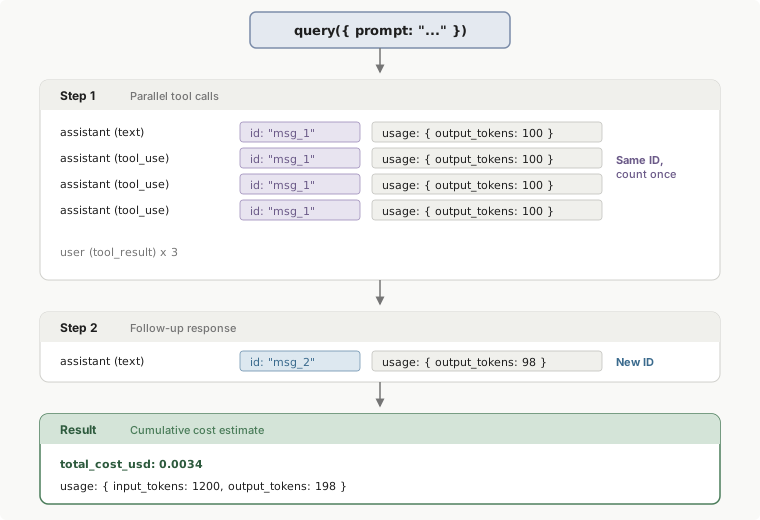
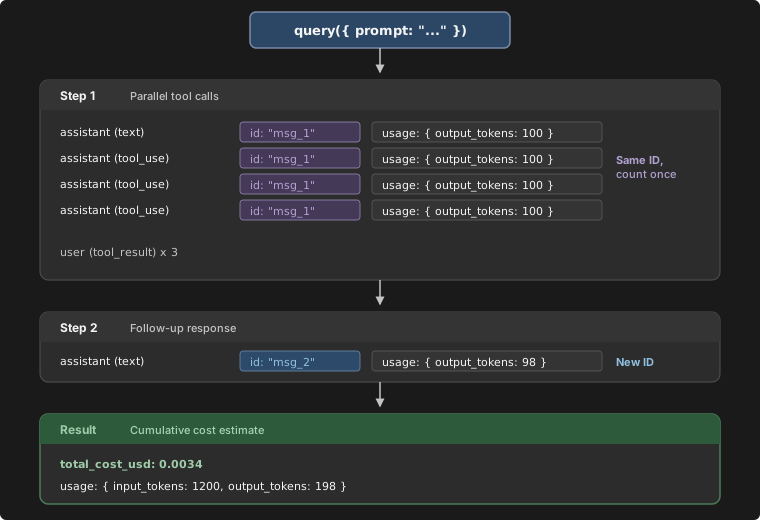
A.11 로컬 실측 (URL 아님)
| 항목 | 결과 | 확인여부 |
|---|---|---|
claude --version |
2.1.258 (Claude Code) |
🖥️ 로컬 실측 |
where.exe claude |
C:\Users\encep\.local\bin\claude.exe |
🖥️ 로컬 실측 |
Test-Path "C:\Program Files\Git\bin\bash.exe" |
True |
🖥️ 로컬 실측 |
$PSVersionTable.PSVersion |
7.6.5 |
🖥️ 로컬 실측 |
Test-Path "$env:USERPROFILE\.local\bin\claude.exe" |
True |
🖥️ 로컬 실측 |
Test-Path "$env:USERPROFILE\.claude\.credentials.json" |
True |
🖥️ 로컬 실측 |
claude auth status |
loggedIn=True, authMethod=claude.ai, apiProvider=firstParty, subscriptionType=max, EXIT=0 |
🖥️ 로컬 실측 |
claude --help (플래그 목록) |
§4.5 에 발췌 보존 | 🖥️ 로컬 실측 |
claude -p ... --output-format json 스모크 테스트 |
미실행 — 도구 승인이 거부됨 | ❌ 미실측 |
총 보존 URL 수: 210개 (A.1~A.10 표의 행 수 합계). A.11 은 URL 이 아니라 로컬 실측 항목이다.
부록 B. 미해결 질문 / 실측 필요 항목
B.1 agy (채택 CLI) — 05a 문서와 교차 확인 필요
agy의 비대화형 플래그 정본이 05a 에 확정 기록되어 있는가? (-p인자/stdin,--output-format상당 옵션)agy가 구조화 출력(JSON Schema 강제) 을 지원하는가? 지원하지 않으면 §8.3 의 (c)/(d) 파싱 경로에 전적으로 의존해야 한다.agy의 종료 코드 체계는? (성공 0 / 인증 실패 / 쿼터 초과를 구분할 수 있는가)agy의 preflight 명령은 무엇인가? (claude auth status에 해당하는 것 — exit code 로 인증 여부를 알 수 있는 명령)agy의 인증 저장 위치와 환경변수 이름은? Windows 작업 스케줄러의 다른 사용자 컨텍스트에서도 읽히는가?agy의 비용/토큰 사용량 보고 필드가 있는가? 없으면 §8.4 의 비용 상한을 호출 횟수 상한으로만 걸어야 한다.agy의 도구 권한 모델은? 도구를 전부 끄는 방법(claude 의--allowedTools ""상당)이 있는가?agy의 stdin 상한이 있는가? (claude 는 10MB)agy가 TTY 없이 실행될 때 어떤 동작을 하는가? 대화형 프롬프트가 뜨면 무한 대기하는가?agy의 자동 업데이트가 플래그를 바꿀 위험이 있는가? 버전 고정 방법은?
B.2 Claude Code (폴백 백엔드) — 실측 필요
- §10.2 스모크 테스트를 실제로 1회 실행해 exit code /
is_error/subtype/duration_ms/total_cost_usd/num_turns를 실측한다. (원본 리서치에서는 도구 승인이 거부되어 미실행) --bare모드에서ANTHROPIC_API_KEY없이 구독 로그인만으로 실행하면 정확히 어떤 에러가 나는가? 문서는 "bare 모드는 OAuth·키체인을 읽지 않는다" 고 하므로, 조사 PC 처럼claude.ai로그인만 있는 환경에서는--bare를 쓰면 안 될 가능성이 크다. →--bare를 쓸지 말지가 이 실측에 달려 있다.--allowedTools ""(빈 문자열)이 PowerShell 에서 제대로 전달되는가? (빈 인자가 삼켜질 수 있음)--json-schema에 여러 줄 JSON 을 인자로 넘길 때 PowerShell 에서 깨지지 않는가? (§10.1 은 공백을 압축했지만 실측 필요)--max-budget-usd초과 시 exit code 는 0 인가 non-zero 인가?subtype이error_max_budget_usd로 오는가?--max-turns초과 시subtype이error_max_turns인가?claude setup-token으로 발급한CLAUDE_CODE_OAUTH_TOKEN이 Windows 작업 스케줄러 환경(다른 사용자 컨텍스트)에서 정상 작동하는가?- 환경변수
CLAUDE_CODE_GIT_BASH_PATH,CLAUDE_CONFIG_DIR,CLAUDE_CODE_OAUTH_TOKEN,CLAUDE_CODE_USE_POWERSHELL_TOOL,CLAUDE_CODE_DISABLE_CRON,CLAUDE_CODE_MAX_OUTPUT_TOKENS,CLAUDE_CODE_PRINT_BG_WAIT_CEILING_MS,CLAUDE_CODE_SIMPLE,CLAUDE_CODE_ENTRYPOINT,CLAUDE_CODE_FORWARD_SUBAGENT_TEXT,CLAUDE_CODE_EFFORT_LEVEL,MAX_THINKING_TOKENS,CLAUDE_CODE_SUBAGENT_MODEL,DISABLE_AUTOUPDATER,MCP_TIMEOUT의 공식 설명을https://code.claude.com/docs/llms.txt를 경유해 확보한다. (env-vars 페이지 fetch 에서 누락됨) SDKResultMessage/SDKSystemMessage의 완전한 타입 정의를 확보한다. (typescript 페이지 fetch 가 Functions/Options 만 반환)Raw mode is not supported에러가 실제로 존재하는가? 비대화형에서 발생 조건은?--restricted모드(v2.1.248+)가 우리 용도(도구 0개 요약)에--allowedTools ""보다 나은가?
B.3 Gemini CLI
gemini가 이 PC 에 설치되어 있는가? 버전과 절대경로는?- 무료 티어 OAuth 의 일일/분당 쿼터 실측치는? (문서가
/docs/resources/quota-and-pricing로 넘김) -p와 stdin 을 동시에 줄 때의 정확한 결합 순서를 실측한다. ("Appended to stdin input if provided" 라면 최종 프롬프트 = stdin + prompt)--output-format stream-json이 실제 릴리스에 있는가? (cli-reference 는 choices 에 포함, headless 문서는 "No stream-json format mentioned" 라고 상충)- 종료 코드
42/53이 실제로 관측되는가? - PR #20700 (stateful headless daemon mode) 이 머지·릴리스되었는가?
B.4 Codex CLI
codex가 이 PC 에 설치되어 있는가? 버전과 절대경로는?codex exec의 종료 코드 체계를 실측한다. (문서 미확인,learn.chatgpt.com/docs/cli-reference404)- issue #15451(
--json+--output-schema가 tools/MCP 활성 시 무시됨)이 현재 버전에서 수정되었는가?--ignore-user-config로 회피 가능한지 실측. codex login --device-auth가 우리 워크스페이스에서 활성화되어 있는가? (관리자 설정 필요)- ChatGPT 구독만으로
codex exec가 실제로 실패하는지 확인 (문서상 "API key 또는 access token 필요") CODEX_ACCESS_TOKEN의 유효기간과 갱신 방법은?
B.5 OpenCode
opencode run이 stdin 파이프를 지원하는가?opencode run의 종료 코드 체계는?--format json의 이벤트 스키마는?opencode.ai문서와github.com/opencode-ai/opencode저장소가 동일 프로젝트인가?
B.6 Windows 스케줄러
New-ScheduledTaskPrincipal -LogonType의 값(S4U,Password,Interactive,ServiceAccount,InteractiveOrPassword,Group,None)과 각각의 정확한 의미를 공식 문서로 확인한다.-LogonType S4U(로그온 여부 무관, 비밀번호 미저장)로 실행할 때 사용자 프로필이 로드되는가? 로드되지 않으면%USERPROFILE%\.claude\.credentials.json을 못 읽어 인증이 깨진다. → 실측 필수. 이 항목이 프로젝트 전체의 무인 운영 가능 여부를 좌우한다.-MultipleInstances의 허용값 목록(IgnoreNew,Parallel,Queue,StopExisting)을 공식 문서로 확인한다.- Task Scheduler 가
.cmd래퍼를 죽일 때 자식 프로세스(python, claude)까지 종료되는가? 아니면 좀비가 남는가? -WakeToRun이 Modern Standby(S0) PC 에서 실제로 동작하는가?- 재부팅 후 태스크가 자동 복구되는지, 부팅 트리거(
-AtStartup)와 일일 트리거를 함께 쓸지 결정한다. - 서비스 사망 시 Windows 토스트 알림을 띄우는 정확한 방법(BurntToast 모듈 vs
New-BurntToastNotificationvs Windows.UI.Notifications COM)을 결정하고 비대화형 컨텍스트에서 알림이 뜨는지 실측한다.
B.7 파이프라인 설계
- 일일 diff 의 실제 크기 분포를 측정한다. 10MB(claude stdin 상한)에 근접할 가능성이 있으면 파일 경로 참조 방식으로 전환하고, 그러면 LLM 에
Read권한을 줘야 하므로 권한 설계를 다시 해야 한다. - AI 요약 1회의 실측 비용과 소요시간을 측정해
--max-budget-usd와 프로세스 타임아웃 값을 조정한다(현재 값0.30/300s는 추정치). - 요약 출력 스키마(§8.3)를 실제 DMF 데이터로 1주일 돌려보고
maxLength·maxItems를 조정한다. - 셀렉터 복구 제안 태스크의 프롬프트·스키마를 설계한다(이 문서에서는 개념만 정의).
- AI 백엔드 폴백 체인의 총 시간 예산을 정한다. (06:00 시작 → 언제까지 리포트가 나와야 하는가?)
- 감사 로그의 보존 정책(90일 제안)과 회전 방식을 확정한다.
total_cost_usd가 client-side estimate 이므로, 월간 실제 청구와의 괴리를 어떻게 모니터링할지 정한다.- 크리티컬 실패 알림과 부가 실패 로그의 경계를 최종 확정한다(§8.5 초안).
이 문서와 확정 설계의 관계
이 프로젝트의 확정 설계는 두 문서에 있다: AI CLI 는 docs/research/05a-agy-cli-ssot.md(agy 채택 확정), 데이터 소스는 docs/design/00-DATA-SOURCE-DECISION.md(공식 Open API 채택 확정, HTML 크롤링 폐기). 이 문서(05)는 그 두 결정에 대해 아래처럼 종속적으로 위치한다.
| 이 문서(05)의 내용 | 확정 설계에서의 지위 | 근거 문서 |
|---|---|---|
| CLI 채택 비교(§3, 특히 §3.4) | 결정을 뒤집지 않는다. agy 채택은 이미 확정됐고, 이 비교는 그 결정이 상대적으로 타당함을 보여주는 근거 자료로만 유효하다 |
05a-agy-cli-ssot.md, 00-DATA-SOURCE-DECISION.md §6 |
agy 자체의 설치·플래그·인증·권한·부트스트랩 상세 |
이 문서에서 다루지 않는다(§2, 중복 서술 금지). 구현 시 반드시 05a 를 정본으로 본다 | 05a-agy-cli-ssot.md (전체) |
| headless 파이프라인 설계 원칙(§8, 원칙 1~9) | CLI 중립적이므로 그대로 구현에 적용된다. agy 로 구현하든 폴백 백엔드로 구현하든 이 원칙들은 변하지 않는다 |
이 문서 §8 |
| AI 역할 정의와 크리티컬 패스 배제 (§8.1의 결정론/LLM 역할 분리) | 확정된 설계와 정확히 대응한다. 데이터 수집·diff·xlsx 생성은 코드, 요약·해석은 AI 라는 원칙이 그대로 이어진다 | 00-DATA-SOURCE-DECISION.md §6 (A1~A7 역할표), 이 문서 §8.1 |
| 프롬프트 인젝션 방어(§8.8) | 확정 설계의 위험 모델과 동일한 전제를 공유한다: 외부 API 응답 문자열이 프롬프트에 들어간다는 전제 자체가 데이터 소스 결정 문서에서 이미 확정됐다 | 00-DATA-SOURCE-DECISION.md §6 (프롬프트 인젝션 방어 절), 이 문서 §8.8 |
| Claude Code / Gemini CLI / Codex CLI / OpenCode 상세 레퍼런스(§4~7) | 참고용으로 보존. agy 가 설치 실패·인증 만료·쿼터 소진으로 못 돌 때의 폴백 백엔드 후보 자료다. 지금 당장 구현 대상은 아니다 |
이 문서 §4~7, §11 |
| Windows 비대화형 실행 공통 함정(§9)과 스니펫(§10) | CLI 종류와 무관하게 유효하므로 agy 배치 스크립트 작성 시에도 그대로 적용한다. agy 고유의 배치 체크리스트는 05a §16 이 별도로 정본이다 |
이 문서 §9~10, 05a-agy-cli-ssot.md §16 |
| 크롤링·봇 차단 우회 관련 함의(구 버전 문서 취지) | 무효화됨. 이 프로젝트는 HTML 크롤링을 하지 않고 공식 Open API 를 쓰기로 확정했다 | 00-DATA-SOURCE-DECISION.md §5, §10 |
| 부록 B 의 agy 관련 미해결 질문(B.1) | 일부는 이제 05a 로 해결됨(비대화형 플래그, 인증 저장 위치, 권한 모델, 종료 코드, 자동 업데이트 대응 등). 남은 항목(stdin 상한, TTY 없는 환경에서의 정확한 동작 등)은 여전히 미검증 상태로 05a 부록 B 와 함께 추적한다 | 05a-agy-cli-ssot.md 부록 B, 이 문서 부록 B.1 |